If a Corpser appears invulnerable in E-Day, stop treating continuous gunfire as the only test and check the current encounter objective. For the October 7, 2026 launch baseline, the September 30 fixes specifically address blast charges delivered during the Horde Siege Corpser Invasion Event failing to register. That confirms an objective-related issue was corrected; it does not establish that every Corpser health-bar problem is fixed or that every apparent immunity is a bug.
Install the available game update, identify whether you are in Campaign or a Horde Siege invasion, and record what changes after the required objective action. There is no verified universal damage threshold or guaranteed boss-reset procedure in the confirmed launch information. Use the encounter's current prompts instead of importing a sequence from an older Gears game.
Identify the encounter before changing tactics
A large enemy surviving several shots is a symptom, not a diagnosis. Write down the mode, mission, difficulty, and current objective. A campaign boss scene and a shared Horde Siege invasion may present the same creature in different contexts, so the mode is the first useful distinction.
For a Horde invasion, check whether the map-wide event is still active and whether other squads are fighting the same threat. Your own squad may have completed its main mission while the invasion still restricts the session. That can make “the boss will not die” and “we cannot extract” appear together without proving that both are technical failures.
For Campaign, record the act and chapter and whether gameplay still responds. If you can move and follow objective prompts, investigate the encounter action first. If the entire game is frozen or the next scene never loads, that is a different technical failure and should be described separately.
Use the launch fixes with their exact scope
The September 30 launch changes fix an issue where delivered blast charges did not register during the Corpser Invasion Event. This is the most directly applicable confirmed fix in the confirmed launch information. Update the game before judging an older clip of the same event.
The same launch notes fix boss health bars and locators scaling incorrectly. A health-bar display problem can make an encounter harder to read, but that does not establish that the enemy is immune. Keep the visible bar state and the event's objective progress separate when comparing the result.
The October 5 update includes broad stability improvements and specific Horde objective corrections. It does not announce that every Corpser encounter, on every difficulty, now has a guaranteed successful outcome. Do not expand a named charge-registration fix into a universal boss repair.
If a delivered charge still appears not to register after your update, that is a useful post-update report. Include the delivery action and what the objective showed afterward. Simply saying that the boss had too much health does not identify the corrected issue.
Follow the required objective action
During a Corpser invasion, inspect the objective instructions and any relevant charge-delivery prompts. The confirmed fix makes registration of delivered charges important to diagnosis. If the event asks for a delivery or interaction, repeatedly firing a weapon is not a substitute for checking whether that action completed.
Keep the action observable:
- Read the current objective rather than relying on a previous phase.
- Locate the item or interaction the current prompt identifies.
- Make the attempt while another player covers the approach where practical.
- Watch for a visible objective update or acknowledgment.
- If it does not change, record the attempt before repeating it.
This sequence intentionally does not assign a universal charge count, spawn location, or timing window. Those details are not established for every current encounter in the confirmed launch information. A fixed number copied from a preview can cause a group to stop checking the live instructions.
If the prompt has changed, follow the new instruction. A creature returning to the battlefield or an event continuing after one action does not by itself mean the previous action failed.
Separate damage feedback from objective progress
Watch more than the boss's overall health bar. Note whether the shot produces hit feedback, whether the creature reacts, and whether the encounter objective advances after its required interaction. These are different observations and can disagree.
| Observation | Useful next check | Unsupported conclusion to avoid |
|---|---|---|
| Gunfire produces no visible progress | Current objective and target state | All weapons are broken |
| Charge action completes but objective remains unchanged | Delivery acknowledgment and other players' views | The charge was definitely credited |
| Objective changes but boss remains present | Next instruction and event state | Every completed action must immediately end the event |
| Bar looks abnormal but the encounter advances | Updated display and session outcome | The creature is necessarily invulnerable |
| Everyone sees no response to the required action | Clip of a controlled repeat attempt | A specific root cause has been proven |
Do not estimate an invisible damage value from a bar that looks stationary. A small change can be hard to see during a large shared fight, and a display issue is not the same as a confirmed damage calculation failure.
The useful distinction is whether the encounter continues to respond to the actions it asks for. That gives you a practical way to investigate without wasting all ammunition on an uninformative test.
Keep the approach safe enough to observe
A charge-delivery attempt is harder to interpret if the player is interrupted, downed, or forced away before the action finishes. Ask the group to cover the person making the attempt and call out whether the interaction actually completed.
This is a tactical suggestion, not an assertion about a hidden delivery timer. Its purpose is to remove obvious interruptions from the test. A clear attempt with a visible result is easier to distinguish from an action abandoned halfway through combat.
Keep at least one player watching the objective state while another performs the interaction. Their comparison can reveal whether the session progressed for everyone or whether only one player's display appeared unchanged. Do not assume agreement until the group has checked the same event stage.
Continue using cover and controlling nearby threats while investigating. The game's shared battlefield can include supporting enemies and other objectives. Ignoring everything except the boss can turn a diagnosis attempt into a squad wipe before you learn whether the required action registered.
Coordinate with the other squads during an invasion
Horde Siege has three four-player squads on the same map. Invasion events notify the whole battlefield and can add temporary restrictions, including blocking extraction or disabling Supply Caches. The official mode description presents these threats as challenges best tackled by squads working together.
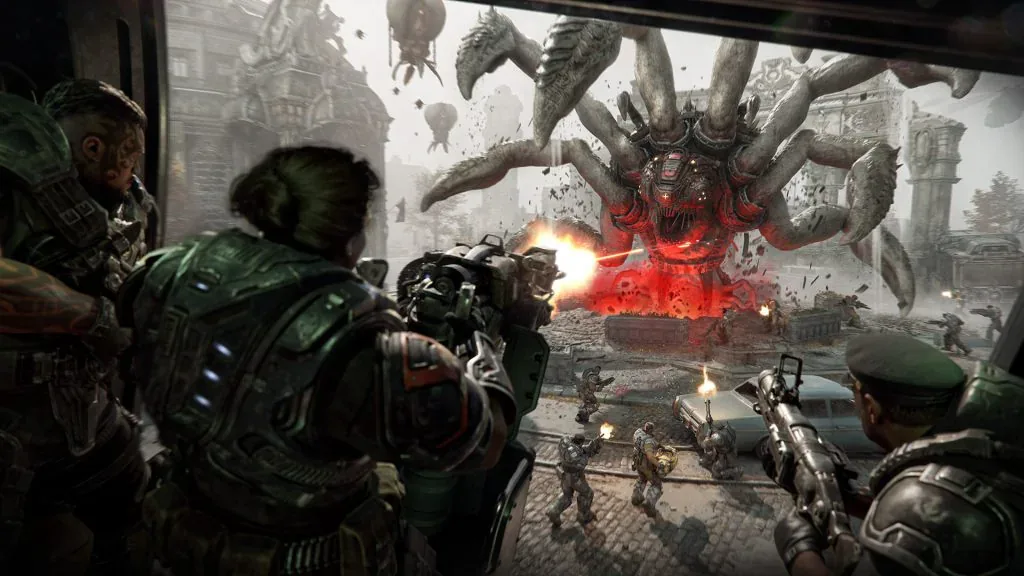
This preview scene illustrates soldiers engaging a Corpser across a shared battlefield. It does not show the active objective or an extraction restriction.
If the invasion is blocking your exit, make that shared condition clear to your squad. Standing at the landing zone and waiting for a helicopter does not resolve the active event. Help the fight and its objective, then check the extraction instructions again when the restriction ends.
Do not confuse your main mission's completion with the invasion's completion. Those can be separate objectives. Also do not assume that another squad has handled the required action simply because many players are firing at the creature.
Assign a simple division of work: one person follows the current event instruction, others keep the approach usable and help surviving players. You do not need a particular class tier list to perform this diagnostic check. The immediate goal is a complete, visible objective attempt.
Avoid mixing in other enemies' mechanics
E-Day's enemies are designed to challenge positioning and target selection differently. The official gameplay description gives distinct examples for Seeders, Boomers, and Reavers. Those examples should not be transferred to a Corpser just because they involve armor or large health pools.
Similarly, older Gears games have their own boss encounters and scripts. A video from Gears of War 2 or Judgment does not establish the correct E-Day objective order. Confirm the game's identity before treating a demonstration as applicable.
If an enemy looks similar but the objective names a different threat, follow the current encounter. A generic “shoot the weak spot” instruction is not enough when the problem you are investigating is a required action failing to register.
Keep your report focused on the Corpser and the specific event state. Adding unverified weaknesses or assumed phases makes it harder to tell whether the group performed the action covered by the launch correction.
Use campaign checkpoint guidance only in Campaign
For a campaign encounter that stops advancing, the launch known issues advise reloading a checkpoint when a long uninterrupted session becomes blocked at an encounter or objective. This is an applicable low-risk next step when the game remains responsive and the campaign menu provides the option.
Record the current objective before reloading, and expect to repeat play since the checkpoint. If the encounter works after the reload, check that you can proceed normally rather than relying only on a changed health bar.
This advice is not a Horde Siege reward-recovery method. Leaving a live Horde mission can jeopardize that run, whose Weapon Parts require successful squad extraction. Do not describe a campaign checkpoint reset as a button available in every shared invasion.
Do not delete the campaign save to reset a boss. The confirmed checkpoint advice does not require removing local or cloud progress, and no universal save-deletion repair is established here.
Report a repeatable failure after the required action
If the updated event remains unresponsive after a clear objective attempt, retain a clip that shows the current instruction, action, and unchanged result. Include platform, launcher if relevant, update status, mode, map or chapter, difficulty, and whether other players saw the same behavior.
For a Horde Corpser charge issue, state whether the delivery completed and whether the objective acknowledged it. For a campaign blockage, state whether a checkpoint reload changed the result. Describe abnormal health-bar or locator behavior separately from a missing objective update.
There is no confirmed universal fix for an unresolved post-update failure in the confirmed launch information. Stop inventing damage numbers or repeating the same unacknowledged action indefinitely. The useful endpoint is either an encounter that visibly advances or a support report that captures exactly which required step remained unregistered.