
For the October 7, 2026 launch baseline, install the October 5 update and compare each player's own campaign records before assuming that a co-op session failed to save. That patch fixes some missing expected Forge Discovery War Journal progress for join-in-progress players. It also fixes players receiving War Journal progress and Forge rewards earned before they joined. Joining an existing campaign should therefore not be treated as a way to inherit every earlier reward from the host.
If a record is missing, preserve the original campaign slot and identify the exact chapter, optional objective, or Forge Discovery affected. There is no confirmed universal save-recovery procedure, and restarting from scratch is not a necessary first step. A missing completion entry, unavailable solo checkpoint, and absent weapon reward are different symptoms.
Separate the records you are checking
Start by naming the missing result. “Our progress did not save” can describe the story resuming at a different point, the War Journal showing an incomplete activity, or a Forge reward not appearing. Record these independently rather than using one percentage as proof that the entire save is broken.
| Record | Useful comparison | Common misunderstanding |
|---|---|---|
| Current campaign position | Act, chapter, and slot used before and after co-op | A different slot is mistaken for lost progress |
| War Journal activity | Exact entry and each player's participation | Host's earlier completion is assumed to belong to everyone |
| Forge Discovery | Discovery reached after the player joined | Missing expected entry is confused with prior host rewards |
| Weapon reward | Specific reward and the activity that supplied it | Owning a reward is assumed to prove all chapter records |
| Difficulty completion | Each player's selected campaign difficulty | Everyone is assumed to use the host's setting |
A player can have one correct record and another missing one. That is why “the host can continue” does not establish that the joining player's Forge Discovery entry registered, and why an unlocked item does not establish complete campaign tracking.
Apply the October 5 co-op correction
Two separate co-op changes matter. First, players joining an existing campaign could receive War Journal progress and Forge rewards earned before they joined. The update addresses that behavior. Second, some join-in-progress players could fail to receive expected Forge Discovery War Journal progress. The update addresses that missing record as well.
Those are opposite situations: an award granted without the relevant earlier participation and an expected discovery entry that was absent. Do not combine them into a rule that “the patch gives guests all host progress.” That would reverse the meaning of the first correction.
Older launch wording about new clients receiving all prior secondary-objective and Hard Case progress described a known issue. It is not a reliable progression strategy after the October 5 fix. Your comparison should focus on what the joining player actually did and what record should correspond to that participation.
The patch text does not establish a full retroactive restoration policy for every previously missing entry. Installing the update is the first action for future sessions, but it is not proof that every historical record or reward will appear immediately.
Establish a clean before-session comparison
Before another co-op session, have each player inspect their own records. Write down the campaign slot, current act and chapter, and the specific missing entry. If the group is investigating a Forge Discovery, capture that entry rather than an unrelated collectible or general completion screen.
- Confirm that everyone has completed the available game update.
- Confirm which player will host and which campaign slot the host will use.
- Note each participant's current record for the activity under investigation.
- Join before the group attempts that activity, where possible.
- Keep a note if a player joins late or disconnects before it is finished.
This procedure is a diagnostic comparison, not a guarantee that starting together repairs a past missing record. It reduces uncertainty about whether a player was present for the part of the session you are trying to verify.
Do not change hosts, slots, difficulty, and chapter at the same time if your purpose is to identify a repeatable problem. Changing all of them produces a different session and makes the result harder to interpret.
Keep separate campaign slots identifiable
E-Day's campaign supports up to five save slots for different playthroughs or states. That is useful for co-op with different groups and difficulty choices, but it also makes slot identity important. A solo run and a friend's hosted run should not be compared as if they are automatically the same saved state.
Check the label and position of the slot you are reopening. If one slot starts earlier than another, record that difference before calling it a rollback. Do not overwrite your original playthrough with a new test just to simplify the menu.
When you switch between groups, keep an ordinary note of which host and slot belong to which run. You do not need an elaborate tracker: a slot name, the group, and the last completed chapter are enough to avoid mixing two playthroughs during a troubleshooting session.
The confirmed launch information does not establish that a guest's personal continuation slot must mirror every host checkpoint. Treat the visible continuation state as something to verify, not as an entitlement that can be guaranteed from co-op participation alone.
Verify an activity while everyone is present
For the next test, choose one supported missing activity rather than replaying a long block of campaign blindly. Let the group reach and finish the relevant activity together, then have everyone check the same entry. If one player joined midway through the session, keep that fact attached to the result.
A useful comparison has a clear before and after: the entry was incomplete before the attempt, the player was present during the activity, and the entry either changed or remained incomplete afterward. Capture any visible reward notification as additional information without treating it as a substitute for checking the record itself.
Avoid assuming that being in the lobby proves participation in an earlier objective. Also avoid using the host's War Journal screen as the only evidence. The question is whether the affected player's expected record changed, so their own screen is the necessary comparison.
If the result is correct, repeat normal play with the same group and monitor the originally missing category. If it is still wrong, preserve the comparison before attempting a different host or chapter. One clearly documented mismatch is more useful than several hours of undocumented retries.
Distinguish an objective blockage from a save problem
If the game never marked the activity complete during play, the problem may occur before saving. An objective that remains active after combat is different from a completed objective that later disappears from a record. Check the current objective text and whether the group could proceed at all.
The October 5 update addresses an Act 2 Chapter 2 Allfather's Plaza objective failing to update after activities elsewhere in the mission. It also addresses one cause of the Act 4 Chapter 2 Power Station defense objective failing to complete after visible enemies were defeated. The phrase “one cause” does not mean every possible Power Station blockage is solved.
The launch known issues advise reloading a checkpoint if a long uninterrupted campaign session becomes blocked at an encounter or objective. Use that advice for an active gameplay blockage, and expect to repeat play since the checkpoint. It is not a confirmed method for restoring a missing historical War Journal entry.
An infinite black loading screen is another separate symptom. If the group cannot enter the next chapter, record the transition; do not treat it as proof that prior rewards were deleted.
Compare after a normal session exit
When the group finishes the test, return through the normal game flow and allow any visible transition to complete. Reopen the game normally and inspect the affected player's records again. This checks persistence without manually modifying local or cloud saves.
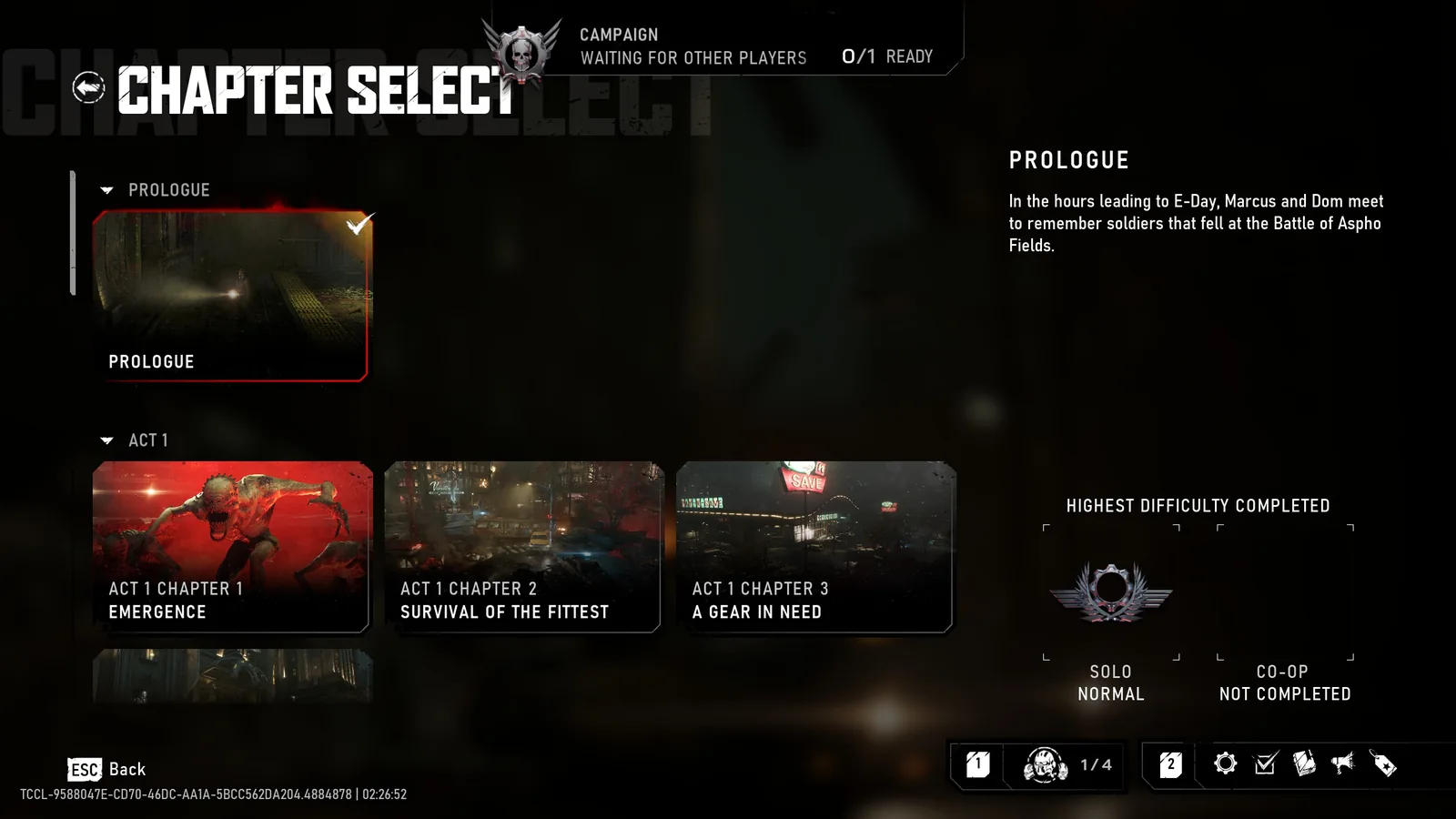
Chapter Select displays solo and co-op completion separately. This example shows the Prologue completed solo on Normal and not completed in co-op; it does not show a War Journal entry or a campaign save slot.
Record whether the entry appeared during the session, after returning to the menu, and after reopening. These observations distinguish an entry that never registered from one that appeared temporarily and was absent later. They also help separate a reward-display problem from a saved-record mismatch.
Do not promise that waiting at a menu for an arbitrary time forces synchronization. The confirmed launch information does not establish such a timer. If the game shows a synchronization message, follow that visible process and record any error it produces.
Keep the original screenshots and the date of the test. A pre-patch failure and a post-patch mismatch should not be combined into one undated claim that the fix never worked.
Preserve progress while the issue is unresolved
Do not delete campaign saves, turn off cloud synchronization, or replace files from another player's account. Those steps can remove the state you are trying to recover and obscure what originally happened. They are not part of the confirmed October 5 co-op fix.
Likewise, an uninstall is not a documented way to restore an expected Forge record. If your game launches and the problem is limited to progression, concentrate on the record comparison and support report. PC installation checks belong to a different failure path when the game itself cannot load normally.
If you choose to continue the campaign, keep a note of new activities completed after the mismatch. That helps you distinguish an isolated missing entry from a continuing problem. If every new record is affected, stop using long sessions as tests and report a short, repeatable example.
Report the expected record precisely
Send Gears support the affected player's platform and launcher, installed update status, host platform, campaign slot, act and chapter, and exact missing entry. State whether the player joined before or after the activity and whether a disconnect occurred.
Include the before and after comparison, any reward notification, and whether the host's record differed. Describe what should have registered based on the activity the affected player participated in. Do not claim that the host's entire earlier history should transfer to a late joiner.
The recovery outcome remains uncertain until the record is actually restored or support confirms what can be recovered. A careful report protects the distinction between missing expected progress and progress the player never earned, which is the central issue in E-Day's launch co-op correction.