If your Gears of War: E-Day x Liquid Death code is not working, first separate a missing promotional code from a code that is rejected during redemption or a reward that is missing after redemption. For the October 7, 2026 baseline, the official offer requires Liquid Death Energy, a participating retailer account connected through the reward landing page, and an eligible U.S. purchase during September 25–November 30, 2026. There is no confirmed universal repair for every failed claim.
Keep your purchase confirmation and any reward email before trying again. Do not buy another pack merely because your first code failed: a browser problem, purchase-linking issue, redemption error, and missing in-game entitlement need different checks. An extra purchase does not explain which stage has stopped.
Identify the stage that failed
The collaboration has a claim path involving the promotion, a retailer, redemption, and the game. Start with the stage you actually reached. “My code does not work” can mean you never received one, received one that is rejected, or completed redemption but cannot see Chainsaw Flex.
| Your current state | Check next | Information to keep |
|---|---|---|
| Retailer connection will not complete | Browser session and the selected retailer account | The visible error and connection stage |
| Purchase completed but no code arrived | Eligibility, purchase account, and claim messages | Receipt, purchase date, and retailer |
| A code arrived but is rejected | Exact redemption message and account | Code email and error screenshot |
| Redemption completed but reward is missing | Game account and cosmetic inventory | Confirmation and the account used |
| Pose is owned but not usable in combat | Where poses are displayed | The selected pose and lobby state |
These distinctions also tell you what to report. A purchase confirmation proves a transaction occurred; it does not by itself prove the promotion registered the purchase or that a game entitlement was applied to the intended account.
Check the official eligibility conditions
The official collaboration announcement names Amazon, Target, Walmart, Instacart, and Kroger as participating retailers. It specifies Liquid Death Energy and an offer limited to the United States. Its dates are September 25 through November 30, 2026.
The announcement's claim order is to use the digital reward landing page, connect your retailer account, and then purchase through that retailer online or in store. Check the purchase against that path before troubleshooting your game installation. Reinstalling E-Day cannot make an ineligible product become eligible.
Do not substitute sparkling water or another Liquid Death beverage based on the brand name alone. Also do not assume the separate chainsaw pint glass purchase supplies the in-game pack. The glass is a merchandise offer, while the reward announcement ties the content pack to Liquid Death Energy.
The official announcement does not establish every purchase quantity, pack size, or handling rule for an order placed before account connection. If your situation depends on one of those details, follow the promotion's displayed terms or ask its support team to assess your receipt. Do not treat a creator's guess about buying one can as a confirmed eligibility rule.
Know which reward you are looking for
The promotion pack is headed by Chainsaw Flex, a Legendary animated pose that can be equipped on any playable character. It also includes a Liquid Death branded in-game banner, emblem, and icon. Check for the correct pack rather than an unrelated pre-order or Premium Edition reward.
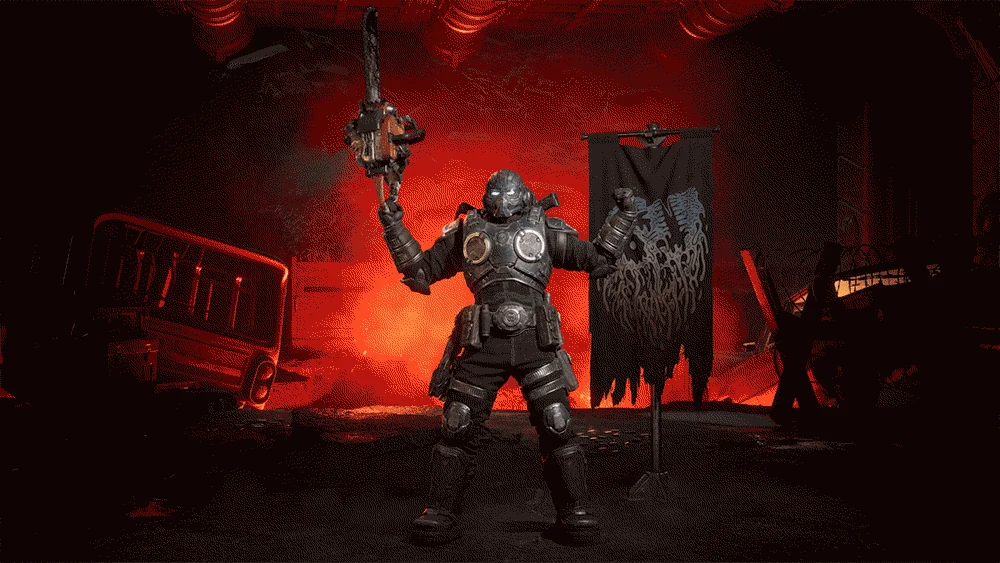
Chainsaw Flex is the pose to identify when checking the reward pack. This animation frame does not prove that an account owns it.
A pose is a customization stance used in lobbies and match presentation. It is not an emote that you trigger during gameplay. If Chainsaw Flex appears in your owned cosmetics but you cannot activate it in a firefight, that alone is not a broken code or a missing entitlement.
Do not use a video description of extra flags or icons to decide that your pack is incomplete. The official announcement identifies the reward categories, and the account's actual owned items are the useful check. Capture the missing category precisely if the pack appears only partly available.
When retailer account linking stops
If the landing page will not finish connecting your retailer, confirm that you are signed into the intended retailer account. The email used for a mailing list and the account used for the purchase are not automatically the same thing. Keep track of both without assuming that receiving a general confirmation email proves the retailer connection succeeded.
One community account described the process behaving differently on a phone and PC. Trying another browser or device is therefore a reasonable browser-side test, but it is an individual attempt rather than a confirmed fix. Use the official promotion route and keep the original claim details consistent.
Close duplicate claim tabs before one fresh attempt so you can follow a single session. If the new session reaches a different stage, record that change. Do not create multiple retailer accounts or move a purchase to another identity simply to see whether a code appears.
An inaccessible page is not proof that the offer has ended. Temporary page access trouble and promotion eligibility are different questions. If the page repeatedly fails, preserve the error and return through the official campaign entry instead of using a third-party code seller or an unofficial replacement form.
When an eligible purchase produces no code
Start with the receipt. Check the retailer, product name, purchase date, and the account used at checkout. Then check the reward-related messages sent to the email used in the claim flow, including spam or filtered folders. Search for the promotion or Liquid Death rather than assuming the code will appear in a game notification.
Early promotional discussions include reports of purchases without codes and a report of a code that would not redeem. Those reports establish that some participants encountered difficulties; they do not provide a verified delivery deadline or prove that every order is affected.
Avoid inventing a waiting period. If the current claim page specifies a delivery timeframe, use that instruction for your order. Otherwise, ask promotion support about the purchase rather than treating an arbitrary number of hours as the point when a code must arrive.
Keep a screenshot of any claim status the page gives you. If the purchase is visible but no code is provided, that is a different report from a page that has no record of the purchase. The receipt helps support connect the issue to a particular order without requiring another purchase.
When the code is rejected during redemption
Copy the code carefully from the original reward message and read the full error before retrying. Check that no extra spaces were included and that you are using the redemption route identified in that message. Do not assume every promotion code belongs in the same place as a retail game key.
Confirm the account shown before submitting. A code accepted on the wrong account creates a different problem from an invalid code. This guide cannot promise that a redeemed entitlement can be transferred between accounts.
Classify the visible error without guessing its cause. “Already redeemed,” a region-related rejection, and an invalid-code response may all stop the claim, but they are not interchangeable. Include the exact wording when contacting support. Do not state that a code has expired merely because the page refuses it during the active promotion window.
Avoid posting the complete code publicly to ask other players to test it. Keep the full value for the official support process if requested. Public screenshots should show the error while hiding the redeemable code and private account details.
When redemption succeeded but the cosmetics are missing
A successful redemption confirmation is the starting point for this branch. Preserve it, then check the game account against the account used for redemption. If you play on more than one launcher or device, be explicit about which account is signed into E-Day on the device where the pack is missing.
Close and reopen the game normally, then inspect the relevant owned cosmetic categories. This is a low-risk refresh check; it does not guarantee instant delivery or prove that a synchronization delay is the cause. Check the pose, banner, emblem, and icon separately rather than looking only for a single pack notification.
If the reward is listed as owned, select it in the appropriate customization context and inspect the lobby presentation. If it remains unowned, record the missing item alongside the redemption confirmation. Do not buy the reward again or pay for another edition of the game to repair an unresolved promotional entitlement.
There is no need to delete your campaign save or reinstall the whole game just to check a pose. The task is to establish whether the account owns the cosmetic and whether the selected item appears where poses are designed to display.
Keep the claim and game-support reports separate
Use the promotion's support route for retailer linking, purchase qualification, and missing reward-code delivery. Use the official game support route when redemption is confirmed but the in-game entitlement remains unresolved. If the code message names a specific redemption support route, follow that instruction for a rejection at redemption.
Prepare a compact report with the purchase retailer and date, product purchased, stage reached, exact error, and whether redemption ever completed. For a missing in-game reward, add platform, launcher, game account, and the specific cosmetic category affected.
State actions already tried and their results. “Tried on phone and PC, retailer connection failed on both” is more useful than “tried everything.” Similarly, “code accepted, pose still unowned after a normal restart” separates delivery from claim eligibility.
Decide the next action without another purchase
If eligibility is unresolved, clarify the product and retailer connection first. If the code never arrived, preserve the receipt and claim status. If the code is rejected, retain its original message and the exact error. If redemption succeeded, concentrate on the account and owned cosmetics.
The official launch announcement says promotional items will become available for Coins and Iron after the partnership exclusivity term ends. It does not provide a specific later availability date for this pack. That future path is not a current code repair, and it should not replace investigating an eligible claim made during the promotion.
The useful outcome is a working claim or a report that identifies the stalled stage clearly. Repeated purchases, random account changes, and unrelated PC troubleshooting only make that identification harder.