The Gears of War E-Day Metallica collaboration has two distinct pieces to recognize: a special instrumental version of For Whom the Bell Tolls in the launch Menu Music selection, and the Legendary Ride the Lightning Weapon Skin Set. Menu Music changes what you hear in the main menu and multiplayer lobbies. The weapon set changes the appearance of customizable weapons. Neither should be confused with a new campaign chapter or a weapon-damage modification.
If you are trying to hear the Metallica track, start with Menu Music. If you are trying to equip the collaboration's weapon appearance, inspect the exact Ride the Lightning skin set and its acquisition text. A specific current price, store rotation, or expiry date for that set is not established here, so check the item before purchasing rather than assuming it follows every ordinary cosmetic's acquisition rule.
Choose the music or skin task first
The same collaboration name can appear around very different customization options. Knowing which outcome you want makes the menu search much simpler. You may already have access to a music choice while a separate skin still has a purchase or partnership requirement. Finding one does not prove ownership of the other.
| Metallica item | E-Day category | Intended result |
|---|---|---|
| Instrumental For Whom the Bell Tolls | Menu Music | Change music heard in the main menu and multiplayer lobbies |
| Legendary Ride the Lightning Weapon Skin Set | Weapon Skin Set | Apply the collaboration's appearance to customizable weapons |
The names also answer different identification questions. For Whom the Bell Tolls identifies the music. Ride the Lightning identifies the weapon skin set. Do not search for a music toggle under weapon modifications, and do not assume choosing the instrumental track automatically applies the Legendary skin to your loadout.
If you are looking at a clip, identify what the clip actually shows. A menu with the song playing demonstrates a music choice. A character carrying a decorated weapon demonstrates an appearance. Without the item menu, neither one tells you the current price, the exact ownership requirement, or whether the uploader obtained it through a particular offer.
Select the instrumental Menu Music
E-Day includes four Menu Music choices at launch, including the special instrumental version of For Whom the Bell Tolls. Menu Music is an equippable customization category, so the useful check is the selected track or playlist rather than a general assumption that all menus always play the same song.
Open the game's customization options and look for Menu Music. Inspect the available entries for the instrumental track, select it if it is available, and apply the selection. Follow the controls displayed by your version; there is no need to assume that an Xbox button prompt matches the Steam keyboard prompt exactly.
Then return to the main menu or a Horde Siege or Versus lobby and listen. Those are the places the Menu Music selection is intended to affect. An ongoing campaign firefight is not the right test for whether the menu track was applied, because the selection is not described as replacing the entire campaign soundtrack.
If you can preview a track before applying it, use that preview to identify the option. If the menu shows a playlist rather than a single track, read what the selection contains. The practical goal is to know which music selection is active, not merely whether the collaboration's name appeared somewhere in the interface.
The instrumental version is the relevant in-game track
The launch music choice is specifically an instrumental version. Do not interpret the absence of vocals as a missing audio layer or a broken download. It is the form of the track included in the Menu Music lineup, rather than a promise that the full vocal recording will play whenever you enter a lobby.
That distinction matters when comparing the game with a music video or another upload. Different recordings, edited trailers, or separately added background music can sound different without revealing a problem in your installation. Compare the selected in-game item with its own preview or playback instead of expecting it to reproduce every version heard elsewhere.
The menu choice also does not establish a Metallica concert event, a playable band character, or a song that you can trigger as an in-match emote. Those would be separate features requiring their own confirmation. For the current task, the supported behavior is a music selection used in menus and multiplayer lobbies.
If you want to keep a different track selected most of the time, you can inspect the available Menu Music choices and choose according to preference. The collaboration is one option within customization, not an instruction to replace every audio preference before playing.
Check music playback without changing unrelated sound
If the intended track is selected but you cannot hear it, first confirm that you are in the main menu or a supported multiplayer lobby. Then inspect the music volume and the output device. Silence during a campaign encounter does not establish that Menu Music failed.
Check whether other game audio is audible. If the entire game is silent, diagnose the output arrangement before blaming one track. If dialogue and effects work but menu music does not, the music-related selection and volume are more relevant. Keep those observations separate so that the problem remains specific.
Make one change at a time. Apply the music selection, return to a menu, and listen before changing output modes or other volume sliders. If you change several settings together, you may restore sound without knowing which change solved it. A stable, repeatable configuration is more useful than an unexplained result.
If the track appears unavailable, inspect the item's displayed state and acquisition information. Do not guess that buying a skin set, changing region, or reinstalling the game unlocks it. Music and weapon skins belong to different categories, and the interface is the place to verify which item you are actually inspecting.
Ride the Lightning is a weapon skin set
Ride the Lightning is the Legendary Weapon Skin Set created in partnership with Metallica. Its purpose is visual customization. It does not add extra lightning damage, increase ammunition, or make a weapon behave like a different class. A dramatic name or appearance is not a mechanical bonus.
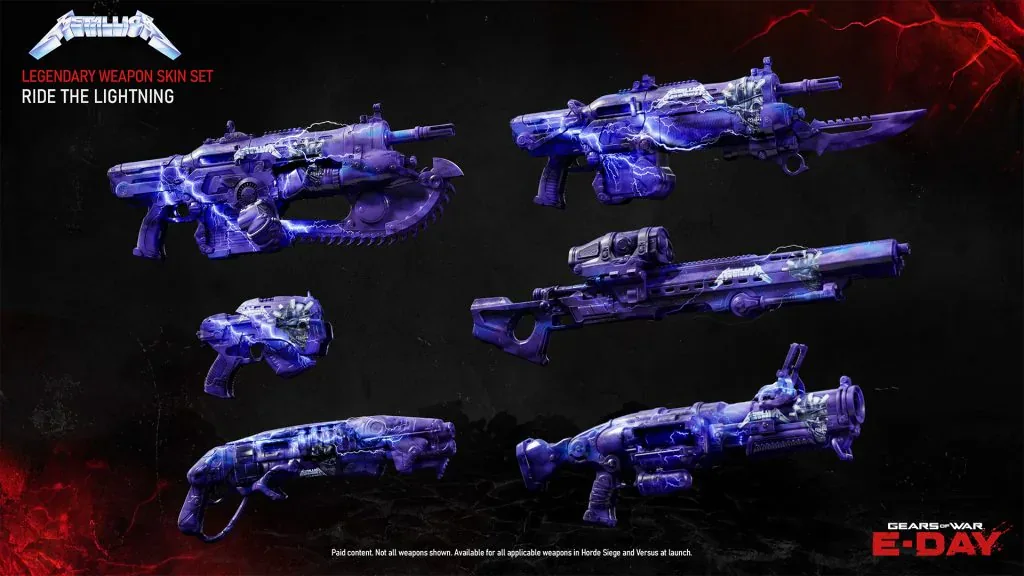
The Ride the Lightning set changes weapon appearance; it is separate from the Menu Music item.
E-Day's weapon skins are acquired as sets. Once you have a skin set in your inventory, you can apply it to customizable weapons without acquiring the same skin individually for every gun. That makes ownership of the set different from equipping it on one particular loadout weapon.
Inspect a preview on the weapon you intend to use before choosing it. The same skin set can look different across weapons because their shapes differ. Match the item name rather than relying only on color or on a partial screenshot. An appearance on another player's Prototype Lancer should not be assumed to show the exact view you will see on every other weapon.
Keep the skin separate from your Weapon Mods. Campaign and Horde Siege modifications can change weapon behavior, while a skin changes presentation. In Versus, PvE Weapon Mods do not carry over, but that mode boundary should not be mistaken for the disappearance of a cosmetic you own.
Verify the acquisition requirement before paying
Partnership items are among the exceptions to E-Day's broad earn-through-play approach. The launch customization information identifies Ride the Lightning as partnership content that must be acquired through its partnership or purchased. Do not assume that every Legendary item uses the same coin price or can be earned by the same challenge.
Check the exact item or bundle currently displayed. Read what it contains, which currency or purchase route is accepted, and whether you already own any part of it. A general description of the collaboration is not a substitute for the current transaction details shown to your account.
If the set is included in a featured bundle, distinguish the bundle contents from the one item you want. E-Day's normal shop supports pricing that accounts for items already owned, but the displayed offer is still what determines the actual purchase. Do not calculate a guaranteed discount yourself from another player's price.
There is no need to purchase Iron or another product simply to investigate the set. Inspect the item first. Your decision is whether the visible cosmetic and its stated acquisition requirement are worth the cost to you, not whether the skin offers a gameplay advantage.
Equip and verify the set on your weapons
After acquiring the set, open weapon-skin customization and locate Ride the Lightning by name. Select the weapon or customization target you want to change, choose the set, and apply it. If the game offers a broader apply-to-set option, read its scope before using it rather than assuming a single weapon selection changes every loadout automatically.
Return to the relevant loadout and inspect the weapon preview. The key checks are that the set is owned and that it is selected for the weapons you intend to use. An owned item can remain absent from your current presentation if you never applied it or if the loadout still uses an earlier choice.
If you change class or mode, verify the equipped appearance again before deciding that ownership failed. In Horde Siege, weapon customization is shared across classes using the same weapon. A different weapon in a new loadout still needs the appropriate cosmetic selection, so compare the actual gun as well as the class.
For a missing item after a confirmed purchase, preserve the transaction confirmation and the account that received it. Record the exact set name and whether it is absent from inventory or simply not showing as equipped. Those are different symptoms. A second purchase should not be the first response to uncertainty about a completed transaction.
Understand availability without inventing a deadline
The launch policy says promotional cosmetics tied to limited partnerships become available in the Barracks for Coins and Iron after the partnership exclusivity term ends. That provides a general later route for partnership items. It does not establish a specific Ride the Lightning date, a current coin price, or that every partnership ends at the same time.
A rotating shop offer also has a different meaning from an item's overall availability. A featured deal may change while an item remains accessible through another category, and a partnership restriction may have its own terms. Read the item listing rather than interpreting the disappearance of one shop tile as proof that the set is permanently gone.
If you are interested only in the instrumental track, complete that music-selection task separately. If you want the skin, verify its ownership and equipped state separately. Those two checks cover the confirmed collaboration content without turning a music choice into a purchase requirement or a cosmetic purchase into a gameplay upgrade.