If the Gnasher appears to do no damage in E-Day, first identify the mode, confirm that the shot actually registered, and repeat a simple shot from a clear angle before changing your settings. The September 30 launch tuning increased Gnasher ADS damage at range and improved hipfire consistency. It does not guarantee a one-shot kill at every distance or establish that every failed-looking shot is a bug.
For the October 7, 2026 baseline, ADS uses camera-oriented firing, while hipfire uses E-Day's hybrid check between camera and muzzle shots. Older claims that the shotgun always fires from only one origin oversimplify that system. Horde Siege also adds class progression, weapon mods, difficulty, and mission conditions, so a PvP expectation should not be applied blindly to a PvE enemy.
Identify what no damage means
A shot that does not kill, a shot that hits for less than expected, and a shot with no visible hit confirmation are separate observations. Start with the exact result rather than assuming that all three indicate broken damage registration.
| Observation | First comparison | What to avoid assuming |
|---|---|---|
| No hit marker or health change | Clear line of fire and a stationary target | A muzzle flash alone proves a hit |
| Hit confirms but target survives | Distance, target, and ammunition state | Every close-looking shot should kill |
| Works in training but feels different online | Comparable angle and online diagnostics | One failed duel proves server desync |
| Weak against a Horde enemy | Difficulty, class progression, and target state | Versus damage expectations apply unchanged |
| Modded shotgun behaves differently | Equipped weapon mods | It still fires the same payload as the base gun |
This comparison is a diagnostic exercise, not a way to blame the player automatically. A reproducible mismatch should be recorded, but it needs enough context to distinguish a missed or partial shot from a genuine failure.
Install the launch tuning before using beta expectations
The September 30 changes include increased Gnasher ADS damage at range and improved hipfire consistency. They also adjust movement responsiveness, cover entry behavior, and slide distance. These changes can affect the circumstances in which you fire, even when the weapon name is unchanged.
Make sure the current game update is installed before recreating a shot from beta footage. A clip from an earlier build can illustrate a technique, but it does not establish the present damage range or a guaranteed shot count.
There is no complete verified damage table in the confirmed launch information. This guide therefore does not assign exact meters, pellet thresholds, or one-shot ranges. If a tutorial gives a precise boundary, treat it as that captured test until it is reproduced under the same current conditions.
The October 5 patch provides further broad stability and service improvements, but it does not announce a universal Gnasher damage fix. Do not attribute every odd result to a patch item that does not mention the weapon.
Start with a controlled shot in Combat Training
Use Combat Training to remove some of the distractions of a live duel. E-Day's training space lets you try weapons and short Locust encounters, and it can support a group practicing together. Begin with ordinary shooting rather than combining several movement techniques.
- Select the Gnasher and note the ammunition state.
- Choose a clear angle with no cover between you and the target.
- Fire while stationary and observe the visible response.
- Repeat after moving farther away.
- Compare aimed fire with hipfire without changing the target and distance together.
Record whether the result is a miss, a confirmed hit, a down, or a kill. Keeping those outcomes separate is more useful than judging only whether the enemy exploded. If your camera moves off the target at the instant of firing, note that too.
The purpose is to establish a baseline you can recognize in a match. A training result does not guarantee that an online fight will have identical conditions, but it gives you something specific to compare.
Check the target at the instant you fire
The Gnasher fires a spread in its ordinary configuration. If only part of that spread reaches the target, the result can differ from a full centered shot. Review the moment of firing rather than the frame where you first aimed at the opponent.
An opponent can move across your view, change height, or disappear partly behind cover before the trigger input produces the shot. A target filling much of the screen does not establish that the entire shot reached it. Likewise, a camera view around a corner does not mean every muzzle or aim condition is equivalent to a clean open shot.
Keep the target centered during the controlled test and repeat from a clear angle. Then compare the original clip. Look for cover edges, a moving target, a changed shoulder position, or an aim adjustment that happened too late.
Do not use a single clip to invent a pellet count or damage percentage. The useful observation is what was visible and what confirmation the game gave, not a numeric explanation that the available evidence cannot support.
Understand the launch firing-origin rules
The official launch explanation says ADS shots fire from the camera position for an accurate, predictable aimed view. Hipfire is different: E-Day checks both camera and muzzle shots and applies the one that better matches the player's expected shot.
This hybrid behavior is why “always aim from the barrel” and “every shot comes from dead center regardless of the scene” are both incomplete explanations. Use the center of your view to keep track of the target, but do not convert a helpful aiming cue into a claim that cover can never affect the result.
For diagnosis, remove the corner or obstacle first. If open-angle shots behave consistently but one cover interaction does not, your report should identify that interaction. Include whether you were aimed or hipfiring, which shoulder you used, and whether you fired while entering or leaving cover.
You do not need to master every shotgun technique to perform this check. Simpler shots make the suspected discrepancy easier to reproduce and explain.
Treat range as a changing condition
If a shot confirms but the opponent survives, move the test closer before concluding that the gun dealt no damage. E-Day shotgun tutorials distinguish close finishing range from farther engagements that need additional shots, but their demonstrations do not supply a universal current distance chart.
At a longer distance, use aimed fire as a comparison. The launch tuning specifically increased ADS damage at range, so an aimed result and a hipfire result should not be assumed identical. Keep the target and range the same while changing the firing method.
If the target remains too far away for your desired shotgun outcome, switch to a suitable ranged weapon or reposition with support. This is a tactical decision, not a repair for a confirmed bug. Chasing a one-shot expectation from outside the useful engagement range can make a normally functioning Gnasher feel broken.
A moving duel constantly changes distance. Review where both players were when the shot occurred, rather than using where they ended up afterward to judge the result.
Check ammunition and reload state
E-Day's Gnasher has a six-shell capacity and round-by-round active reloading. That means a short reload may leave you with only part of the capacity refilled. Check the actual loaded shells before a retest rather than assuming that starting a reload made the weapon full.
E-Day shotgun tutorials describe different outcomes with active ammunition. For a useful damage comparison, keep the ammunition state consistent and note whether you used a perfect active reload. Do not compare one active shot with a normal shot and call the difference random.
You can load a round or two without completing a full cycle, but that flexibility also makes the state easier to overlook during combat. A shot that never occurred because the weapon was empty is different from a shot that fired and failed to register.
This page does not need a full reload tutorial to diagnose damage. The essential check is simply that the gun fired, the shell state was known, and the comparison used the same conditions.
Separate Horde Siege from Versus
Versus has no weapon mods and is designed around equal starting loadouts. Horde Siege includes class progression, weapon customization, mission difficulty, and conditions that can change the fight. A familiar weapon model does not make those modes equivalent tests.
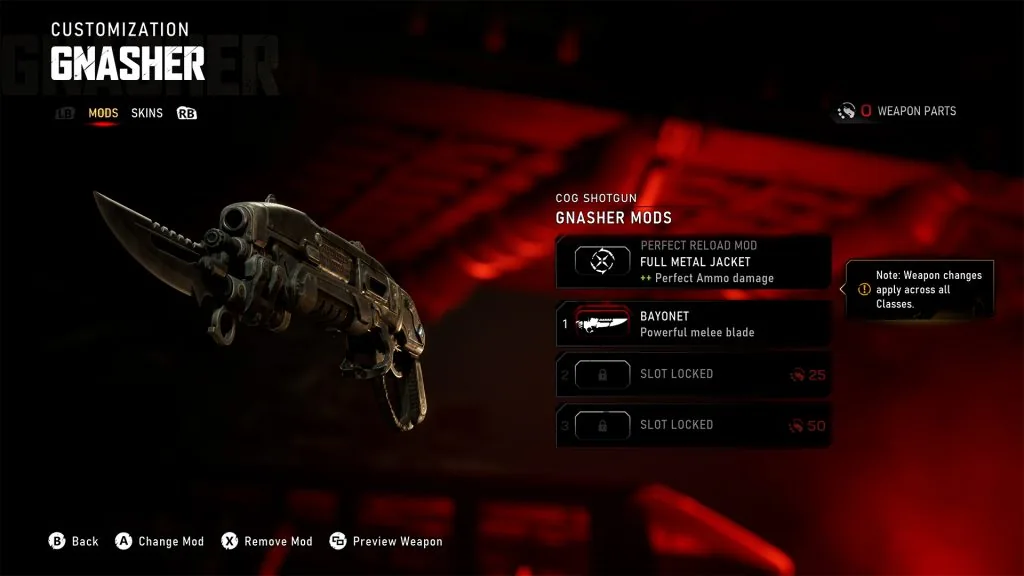
This preview Gnasher interface shows equipped modifications to check before comparing Horde behavior with Versus. The displayed costs are not a current launch-price reference.
In Horde, inspect the weapon mods you actually equipped. E-Day weapon demonstrations describe a slug mod changing the Gnasher to a single large payload. If you use such a configuration, judge it by that behavior rather than assuming the ordinary spread is still present.
Check the selected difficulty against your class progression. Classes gain health and damage increases at progression milestones, and the mode recommends difficulty based on class level. An underdeveloped class facing a harder mission can experience much tougher targets without establishing a damage-registration failure.
Also check mission modifiers, poison effects, and the enemy's current state. A durable or protected target surviving a blast does not prove the weapon failed. Choose a simpler comparable encounter before reporting that all Gnasher damage is absent.
Document online-only inconsistencies
If a controlled shot works but the same simple scenario repeatedly fails online, keep a short clip with the target, shot, hit confirmation, and visible outcome. Record platform, mode, map, installed update status, and whether the problem affects other weapons as well.
Use the game's online diagnostics if they are available in your current settings and keep the displayed values with the clip. A connection warning is relevant context, but it does not by itself identify the root cause of a single missed shot.
Do not label every online discrepancy “desync” without a repeatable comparison. Equally, do not dismiss a consistent failure merely because training works. The report should describe the difference and let support assess the technical cause.
Avoid importing Reloaded or older Gears complaint threads as proof of an E-Day bug. Weapon behavior and game identity must match the current case.
Keep the next test simple
After a strange duel, return to a clean angle, known shell state, and clear target. Compare normal and aimed shots at a manageable distance, then add the original movement or cover interaction only if the baseline behaves consistently.
If the failure persists under those simple conditions, submit the clip and comparison through Gears support. Preserve the exact symptom: no shot, no confirmation, confirmed low damage, or target surviving an expected finish. That description gives the investigation more to work with than a blanket claim that the Gnasher does nothing.