If you are stuck when entering Allfather’s Plaza in Act 2 Chapter 2, install the October 5 update or a later update before changing anything else. The official patch specifically addressed an issue that could prevent the objective from updating when a player entered Allfather’s Plaza after completing activities elsewhere in the mission.
After confirming the update has finished, close the game completely, reopen it, load the affected campaign, and test the entrance again. Do not delete either your local save or your cloud save. The published fix addresses the known objective-state failure, but it does not document a special button, alternate route, or guaranteed repair procedure for every save that may still appear blocked.
Confirm the exact Allfather’s Plaza failure
This fix applies to a narrow campaign problem. Check all of the following before treating your situation as the patched Allfather’s Plaza bug:
- You are playing Act 2 Chapter 2.
- You can load into the campaign and continue controlling your character.
- You have completed one or more activities elsewhere in the mission.
- You enter Allfather’s Plaza, but the current objective does not update as expected.
- The problem is progression state rather than a loading screen that never finishes.
The important signal is the objective failing to advance at the moment you enter the plaza. The October 5 patch notes describe that precise sequence: activities are completed elsewhere in the mission, the player enters Allfather’s Plaza, and the objective fails to update.
Do not merge different failures into the same diagnosis. An infinite loading problem has its own troubleshooting scope. The Power Station defense objective is in Act 4 Chapter 2, and its patch note concerns a different situation in which the defense could fail to complete after the visible enemies were defeated. Advice for either of those problems is not evidence for repairing the Allfather’s Plaza transition.
A combat encounter that is still actively spawning enemies is also different from an objective that remains unchanged after entry. Before troubleshooting, allow any current combat or dialogue to finish and check whether the objective actually remains stalled. This prevents an ordinary encounter delay from being mistaken for the known campaign-state bug.
Apply the October 5 fix before changing the save
The official October 5 campaign update is the only documented fix for this exact Allfather’s Plaza problem. It was released ahead of the October 6 global launch and addressed the objective failing to update in Act 2 Chapter 2. No numeric game version is available here, so do not rely on an unsourced build number from a forum post or video.
Use this order so that the least destructive checks come first:
- Leave the affected campaign session. Return to a point where you can close the game normally. Do not erase the campaign slot or begin changing save files.
- Close the game completely. A session that stayed open while an update downloaded may not be running the newly installed code. Make sure the game is no longer suspended or active in the background.
- Check the platform’s update status. Allow every pending Gears of War: E-Day update to download and install. If the platform reports that an update is queued, paused, or incomplete, resolve that before loading the campaign again.
- Restart the game after installation. Launching a fresh session removes ambiguity about whether the old executable was still active.
- Load the affected Act 2 Chapter 2 campaign. Use the existing campaign state first. The patch is intended to address the objective transition, so there is no reason to delete the save before seeing whether the updated game can advance it.
- Return to the Allfather’s Plaza entrance. Cross into the location and watch the objective display, route guidance, dialogue, and any encounter transition. The test succeeds when the mission state advances rather than remaining on the earlier instruction.
- Pause additional experimentation once it advances. Continue from the newly updated objective and make sure normal progression resumes. Avoid repeatedly reloading or switching sessions after the state has corrected itself.
If your platform does not show a precise version number, that alone does not prove the update is missing. What matters is whether its update service says the game is current and whether you restarted the game after installation. Do not substitute an unofficial version string for the platform’s actual update status.
Retest the objective transition safely
A clean retest should answer one question: does the objective now update when the existing campaign enters Allfather’s Plaza? Keep the test narrow so that you know which action changed the result.
Start with the current save and the nearest available campaign resume point. If the state is still frozen, reload the current checkpoint if that option is available in your session, then make the approach again. Reloading a checkpoint is a limited retry; deleting an entire save is not. Do not repeatedly alternate between local and cloud data or overwrite a working save in an attempt to force the trigger.
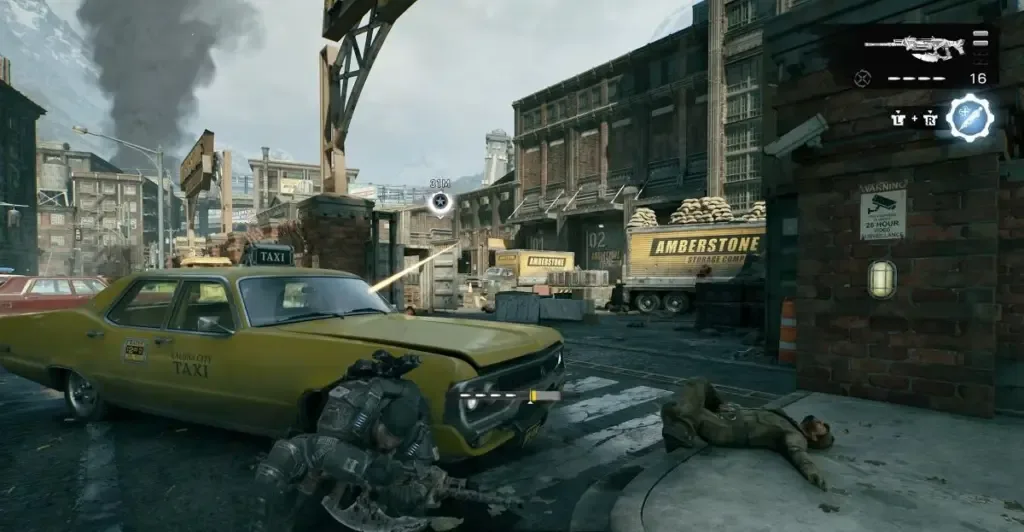
Amberstone Storage Facility provides route context. This frame does not verify that the plaza objective has completed.
During the retry, look for a change in mission state rather than a particular line of dialogue or exact objective wording. The official patch note confirms the failed update, but it does not publish the before-and-after HUD text. A successful result may therefore be shown through updated guidance, a new encounter state, squad movement, or another normal progression signal. The decisive result is that the campaign lets you continue beyond the transition.
Use this compact decision table to keep the next action tied to what you actually observe:
| What you observe | What it means | Next action |
|---|---|---|
| An update is pending or incomplete | The documented fix may not be active | Finish the update, close the game, and launch it again |
| The game was suspended during installation | The active session may predate the installed update | Fully close and restart the game before retesting |
| The objective advances on re-entry | The patched transition is working | Continue the chapter normally |
| The objective remains unchanged after a clean restart | The documented fix has not recovered this state | Preserve the save and prepare a support report |
| The game never finishes loading | This is not the confirmed Allfather’s Plaza objective-update symptom | Stop using this page’s procedure as the diagnosis |
| The failure occurs at the Power Station | This is a different chapter and objective | Use Power Station-specific guidance instead |
Avoid adding unrelated variables during the first retest. Changing difficulty, searching for collectibles, replaying unrelated activities, or following directions written for another chapter will not demonstrate whether the patched plaza transition works. The cleanest evidence comes from updating, restarting, loading the affected chapter state, and trying the same entrance again.
If the objective is still stuck after updating
The patch note says the issue was addressed; it does not prove that every possible progression failure has the same cause. If the objective remains frozen after a confirmed update and fresh launch, treat it as an unresolved post-patch case rather than declaring that the original bug is universally unfixed.
First, repeat only the low-risk checks:
- Confirm that the campaign is Act 2 Chapter 2 rather than a later return to Kalona.
- Confirm that the game was restarted after the update finished.
- Verify that the symptom is an unchanged objective after entering Allfather’s Plaza.
- Try one checkpoint reload if the campaign interface offers it.
- Record whether you are playing solo or in online co-op.
- If playing co-op, note who hosts the campaign and whether every player is fully updated.
The official material does not provide a separate co-op-only Allfather’s Plaza workaround, so do not present changing hosts or rebuilding the party as a confirmed repair. Session details are still useful when reporting the failure because they help distinguish one campaign state from another.
If the same state remains blocked, use the official Gears support route referenced by the patch notes. A focused report is more useful than a broad statement that the chapter is broken. Include:
- Platform and storefront.
- Whether the campaign is solo or online co-op.
- The chapter name: Act 2 Chapter 2.
- The location: Allfather’s Plaza.
- The objective shown before entering the plaza.
- Which other mission activities had already been completed.
- Whether the game had been fully restarted after updating.
- What changed, or failed to change, when entering the plaza.
- A screenshot or short recording showing the HUD before and after entry.
- Whether loading the current checkpoint produced the same result.
Do not invent a numeric version when reporting the issue. If your platform exposes one, copy it exactly from the interface; otherwise state that the platform reported the game was current on the date of the test. That is more reliable than borrowing a build number from another platform or an unofficial post.
Preserve the blocked save while seeking support. It may contain the campaign state needed to diagnose the remaining failure, and deleting it removes the possibility of testing a later correction. If you want to continue playing elsewhere, use only normal in-game save or chapter options that do not overwrite the affected progress.
Actions to avoid
Do not delete cloud saves, local saves, or an entire campaign profile as a generic fix. The October 5 notes do not instruct players to do so, and destructive save changes can turn a recoverable objective problem into permanent progress loss.
Also avoid these unsupported responses:
- Do not claim that the issue still affects every updated player. Earlier reports do not establish reproduction after the patch.
- Do not promise that replaying the whole chapter will repair every save. No such guarantee is documented.
- Do not use a Power Station workaround for Allfather’s Plaza. The locations, chapters, and failure conditions differ.
- Do not diagnose an infinite loading screen as this objective-state problem.
- Do not follow a route from a later Kalona chapter and expect it to trigger the Act 2 objective.
- Do not overwrite a working save merely to test an unofficial workaround.
- Do not assume that visible completion of unrelated side content proves the plaza trigger has already fired.
The safe recovery boundary is straightforward: install the update, restart the game, retry the existing Act 2 Chapter 2 transition, and preserve the save if the objective still does not advance. Beyond that point, collect exact evidence and escalate the remaining post-patch case instead of taking destructive action.
The successful end state
You are no longer stuck when the campaign recognizes entry into Allfather’s Plaza and replaces the earlier objective with the next valid mission state. Once that happens, continue the chapter normally; no additional save repair is indicated.
If the objective remains unchanged after the October 5 update or later has been installed, the correct outcome of this guide is not a risky workaround. It is a clearly identified post-patch Allfather’s Plaza report with the original save preserved, unrelated bugs excluded, and enough detail for official support to investigate.