If the Gears of War E-Day Power Station objective is not completing, first confirm that the generator has reached 85% and that you have closed the breaker only after reaching that threshold. Readings of 45% and 65% are intermediate stages, not prompts to use the breaker. If every visible enemy is dead but the defense objective still does not advance, install the October 5 update before replaying the encounter. That update addressed one cause of this Act 4 Chapter 2 failure, but it did not establish that every possible cause was fixed.
The safest recovery order is to update the game, reload the latest checkpoint, repeat the defense and generator sequence without using the breaker early, and restart the chapter only if the checkpoint keeps restoring the same broken state. Do not delete local or cloud saves as a generic fix. There is no published guarantee that deleting progress will repair this objective.
Identify the point where progress stopped
The Power Station sequence appears in Act 4, Chapter 2. Bravo reaches Prospect Bay after the train journey and must restore the district power before communications can be recovered. The station technicians restart the machinery while the squad defends the area from the Locust.
Two situations can look similar but require different responses:
| What you see | What it means | What to do next |
|---|---|---|
| Generator output shows 45% | The restart is still in progress | Continue defending and wait |
| Generator output shows 65% | The restart is still in progress | Continue defending and wait |
| Generator output reaches 85% | The breaker interaction is now due | Close the breaker |
| All visible enemies are dead, but the defense objective remains active | The encounter may have entered the objective-state failure addressed in part by the October 5 update | Confirm the update is installed, then reload and replay the encounter |
| The breaker was closed at 85%, power returned, and the squad can leave | The station sequence has completed normally | Return toward port control and clear the position |
Do not treat a pause at 45% or 65% as proof that the mission is broken. Those percentages are expected stopping points on the way to the required 85% reading. The actual warning sign is an encounter that remains on the defense state after the visible threat has been cleared and does not continue toward the breaker step.
Complete the Power Station sequence in the intended order
A clean replay should preserve the encounter’s order instead of rushing directly to the breaker. The station is a defense objective followed by a timed breaker interaction, not a single switch puzzle.
-
Enter the Power Station objective area in Act 4 Chapter 2. The station supplies the Prospect Bay grid, which must be restored before the communications equipment at port control can be used.
-
Collect the available sentry kits before beginning the repair. Place the sentries so they help cover the approaches used by the Locust. The technicians need protection while the generator output rises, so starting the repair without preparing the defense removes useful support from the encounter.
-
Begin the repair and remain close enough to protect the technicians. Watch the approaches instead of standing at the breaker and waiting for an interaction. Respond to the side taking pressure and keep the defense under control while the machinery restarts.
-
Clear the attacking enemies. If the objective does not advance after every enemy you can see has been defeated, do not immediately assume that another switch is hidden in the room. This exact completion state is the one associated with the officially acknowledged Act 4 Chapter 2 problem.
-
Watch the generator output. At 45%, keep waiting. At 65%, keep waiting. Neither percentage is the completion threshold, and using the breaker early is not the documented sequence.
-
Close the breaker at 85%. Once the generator reaches 85%, use the breaker to restore power across Prospect Bay. This is the required interaction that finishes the station’s power-restoration sequence.
-
Return toward port control. Restoring electricity does not automatically secure the communications site. Locust still occupy the area around port control, so push back toward the tower and clear the position before the story can continue to the longer-range communications objective.
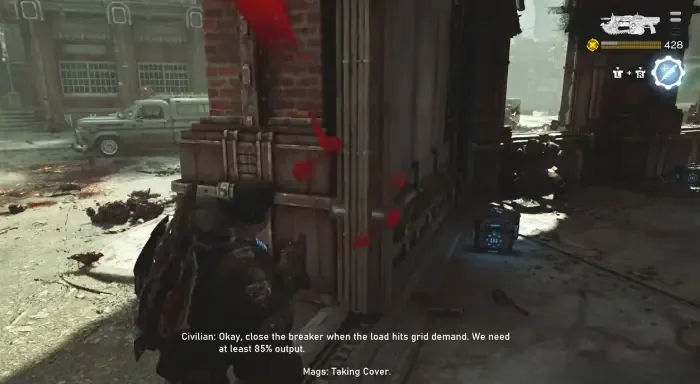
Close the breaker only after the generator reaches 85 percent.
If your current attempt has not yet reached 85%, continue the defense before trying recovery steps. Reloading a functioning encounter at 45% or 65% can waste time and may recreate the same unfinished stage without addressing anything.
Recover an objective that remains active after the fight
Use the following recovery order from least disruptive to most disruptive. None of these steps should be treated as a guaranteed fix for every remaining case, because the official update describes only one corrected cause.
1. Confirm that the October 5 update is installed
Fully close the game and use your platform’s normal update check. The October 5 update was released ahead of the global launch and specifically addressed one cause of the Power Station defense objective failing to complete after all visible enemies had been defeated.
Do this before repeatedly replaying the encounter. If the game is still running an earlier build, reloading the same checkpoint may continue to reproduce the pre-update failure. The patch notes do not provide a numeric version identifier for this fix, so use the update’s date and availability rather than comparing against an invented version number.
2. Reload the latest checkpoint
After updating, load the most recent checkpoint and approach the encounter again. Collect the sentry kits, start the repair, defend the technicians, and wait for the generator readings in their normal order.
During the replay, keep these checkpoints for your own observation:
- The defense begins after the repair is started.
- The generator progresses through 45% and 65%.
- All attacking enemies are cleared.
- The output reaches 85%.
- The breaker becomes the next required interaction.
- Closing it restores power and allows the squad to leave for port control.
If those events occur, the objective has recovered. If all visible enemies are gone but the defense prompt remains and the output cannot continue, the same objective-state problem may still be present.
3. Repeat the encounter without closing the breaker early
On the next attempt, avoid interacting with the breaker at 45% or 65%. The walkthrough sequence explicitly requires waiting until 85%. This separates a timing mistake from the patched completion bug: an early interaction attempt means the required threshold has not been reached, while a defense state that persists after the visible fight is over matches the acknowledged failure more closely.
Stay in the active encounter area and finish the defense before moving around in search of another route. There is no supported alternate control that replaces the 85% breaker interaction. The objective is supposed to move from defense, to the required generator output, to closing the breaker.
4. Restart Act 4 Chapter 2 if the checkpoint preserves the failure
If the latest checkpoint repeatedly loads into the same non-completing state, restart Act 4 Chapter 2 and replay the Power Station approach. This is more disruptive than a checkpoint reload, so reserve it for a checkpoint that consistently reproduces the failure after the game has been updated.
A chapter restart gives the mission another opportunity to establish the defense and generator states from an earlier point. Follow the intended sequence when you return to the station rather than trying to reproduce the exact timing of the failed attempt.
5. Report a repeatable post-update failure
If an updated game still stops after all visible enemies are defeated, send the case to Gears Support. Record details that distinguish this problem from unrelated campaign issues:
- Act 4, Chapter 2
- Power Station defense objective
- Whether the generator stopped at 45%, 65%, or another visible state
- Whether every visible enemy had been defeated
- Whether the breaker reached its intended 85% interaction point
- Whether reloading the checkpoint changed the result
- Whether restarting the chapter changed the result
- Whether the session was solo or online co-op
That information identifies the exact objective and failure stage without conflating it with the separate Allfather’s Plaza issue in Act 2 Chapter 2 or with an infinite loading problem.
What the October 5 patch fixed and what it did not prove
The October 5 campaign notes say that the update addressed one cause of the Act 4 Chapter 2 Power Station defense objective failing to complete after all visible enemies were defeated. The wording matters.
It supports three conclusions:
- The non-completing defense state was a recognized game issue rather than necessarily a missed enemy or undiscovered control.
- An update was released with a correction relevant to this encounter.
- Players on an older build should update before spending time on repeated recovery attempts.
It does not support broader claims that every Power Station problem has been eliminated, that a post-update report must be player error, or that one destructive save procedure fixes all remaining cases. The notes also do not promise that an already-broken checkpoint will repair itself immediately after installation. Reloading the encounter, and then restarting the chapter if necessary, are cautious ways to rebuild its objective state while preserving saves.
Avoid fixes that target the wrong problem
This page concerns the Power Station defense and breaker sequence only. Several nearby or similarly described problems belong to different mission states.
- A reading of 45% or 65% is not the completion point. Wait for 85% before closing the breaker.
- Restoring power is not the end of the wider communications task. After the breaker, Bravo still has to return to port control and clear the occupied position.
- Allfather’s Plaza is a different objective issue. The October 5 notes list it under Act 2 Chapter 2, separately from the Power Station fix in Act 4 Chapter 2.
- An infinite loading screen is not the same failure. A loading problem occurs before or between playable states; the Power Station bug described here leaves the player in an active defense encounter that will not complete.
- Later Act 4 refinery controls are unrelated. The backup coolant feed, Zone 5 key card, enriched emulsion controls, Scoria fight, and tank dump belong to a later chapter and cannot advance the Power Station objective.
- Deleting saves is not a supported generic remedy. Preserve local and cloud progress while using checkpoint reloads, a chapter restart, and support reporting.
The expected end state is simple: defend the technicians, allow generator output to reach 85%, close the breaker, restore the Prospect Bay grid, and leave for port control. If the defense remains active after the visible enemies are gone, update first and then rebuild the encounter state through a checkpoint reload or chapter restart.