Gears of War: E-Day does not have an officially confirmed 120 FPS mode on Xbox Series X or Series S. As of October 9, 2026, the official Xbox game page advertises up to 60 FPS across Campaign and Multiplayer. It also lists 4K Ultra HD and HDR support, but it does not document a selectable 120 FPS console mode.
A console or television showing a 120 Hz output signal does not change that answer. Refresh rate describes how often the display can update; frame rate describes how many frames the game renders. An Xbox can therefore output a 120 Hz signal while E-Day itself renders at 60 FPS, 40 FPS, 30 FPS, or a fluctuating rate. Seeing 120 Hz in the console dashboard or television information panel is not proof that the game is running at 120 FPS.
The clearest practical answer is:
- Treat 60 FPS as the officially advertised maximum for the Xbox version.
- Do not buy a 120 Hz display specifically to unlock an undocumented 120 FPS E-Day mode.
- Use the in-game mode selector, if available on your console and current build, to choose among the modes actually shown there.
- Treat beta performance measurements as useful technical context, not final mode documentation.
- Do not interpret VRR support, a 120 Hz output signal, or a mode named Performance as evidence of 120 FPS.
What Xbox officially confirms
The official Xbox listing says Gears of War: E-Day is optimized for Xbox Series X|S and supports 4K Ultra HD, HDR, and 60 FPS. Its technical description is even more specific: the game is built for modern performance with 4K resolution and up to 60 FPS across Campaign and Multiplayer.
That wording establishes a ceiling for the advertised console experience, not a guarantee that every scene, mode, or console will maintain 60 FPS at all times. The phrase up to 60 FPS also does not mean 120 FPS can be enabled through a hidden console setting. If Microsoft or The Coalition adds a higher-frame-rate mode later, it would need new, explicit documentation or an in-game option before it should be treated as supported.
The official page also notes that 4K and 60 FPS require a compatible display. This condition means the display must support the advertised presentation features. It does not turn 60 FPS into 120 FPS when connected to a 120 Hz television or monitor.
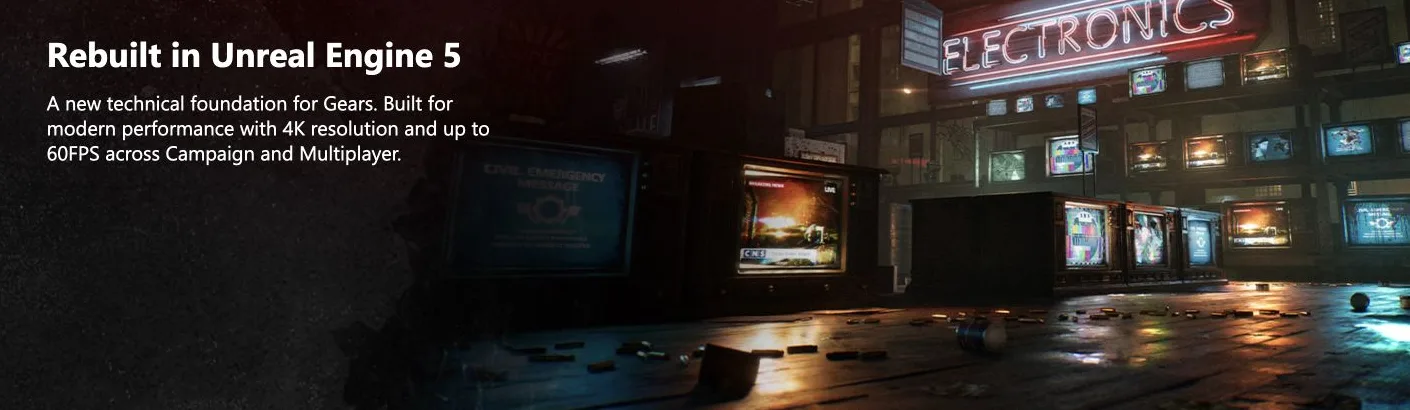
Microsoft advertises up to 60 FPS across Campaign and Multiplayer. This official panel does not confirm a 120 FPS mode.
Confirmed and unconfirmed claims
| Claim | Current status | What it means |
|---|---|---|
| Up to 60 FPS on Xbox | Officially confirmed | Xbox advertises a maximum of 60 FPS across Campaign and Multiplayer. |
| 4K Ultra HD and HDR | Officially confirmed | These features require a compatible display. |
| Selectable 120 FPS mode | Not officially confirmed | The official Xbox listing does not advertise such a mode. |
| 120 Hz console output | Separate from game FPS | A 120 Hz signal alone does not show that E-Day renders 120 frames each second. |
| Performance, Balanced, and Quality modes | Reported from the August beta | These measurements describe pre-release beta code and must not replace current in-game or official information. |
| VRR mode or behavior | Mentioned in beta coverage | VRR can affect presentation of changing frame rates, but it is not proof of a 120 FPS render mode. |
Why 120 Hz and 120 FPS are not interchangeable
The numbers can look identical in a television overlay, which is why the distinction causes confusion. They measure different parts of the display chain.
FPS is the game-rendering rate. A 60 FPS game produces up to 60 new frames in one second. A 30 FPS game produces up to 30. Reaching 120 FPS would require the game to render as many as 120 distinct frames each second and would normally be identified through an explicit higher-frame-rate option or official specification.
Hz is the display refresh rate. A 120 Hz television or monitor can refresh its panel up to 120 times per second. The console may keep a 120 Hz output enabled even when a particular game renders fewer unique frames. The display can repeat frames or present them according to the active output behavior, but that does not create additional frames rendered by the game.
VRR is another separate label. The beta preview mentioned VRR support, but the preview did not fully test it. Variable refresh behavior can help the display follow changes in the delivered frame rate. It does not automatically double a 60 FPS game to 120 FPS, and it should not be used as evidence that an undocumented 120 FPS mode exists.
Use an explicit frame-rate counter, a documented game mode, or a current technical analysis when you need to identify rendered FPS. A television panel that only reports 120 Hz is reporting the signal or refresh state, not necessarily the number of unique frames E-Day is producing.
What the Series X beta preview reported
Digital Foundry's August 2026 preview examined pre-release beta code on Xbox Series X and reported three principal modes:
| Series X beta mode | Reported frame-rate target | Reported internal resolution | Important context |
|---|---|---|---|
| Performance | 60 FPS | Approximately 1000p | Competitive Versus was reported as consistently 60 FPS, while demanding Horde encounters could dip into the 50s. |
| Balanced | 40 FPS | 1080p | The preview had limited time to examine this mode fully. |
| Quality | 30 FPS | 1224p | It offered a higher internal resolution and slightly better-defined lighting than the other reported modes. |
None of these beta modes was reported as a 120 FPS mode. Performance mode was the fastest of the three, and its stated target was 60 FPS. The name Performance therefore should not be read as shorthand for 120 FPS.
The preview found that the visual differences between the Series X modes were comparatively subtle. Quality mode raised internal resolution and showed somewhat better-defined lighting, while Performance mode prioritized the higher 60 FPS target. The beta also used Unreal Engine 5 features including Nanite assets, hardware Lumen global illumination and reflections, and MegaLights. Those rendering features help explain why a 60 FPS target can still involve technical tradeoffs on a console.
The preview observed a consistent 60 FPS during competitive Versus matches in Performance mode, but more demanding PvE Horde encounters sometimes fell into the 50s. That result is not evidence against the official up-to-60-FPS specification; it illustrates why an advertised maximum and measured performance are different statements. It also came from pre-release code, so it should not be presented as a guaranteed description of every scene in the released game.
Balanced and Quality were reported as more consistent during the limited beta test, although the preview did not thoroughly explore Balanced mode. That limitation matters. A single beta analysis can help explain the intended tradeoffs, but it cannot establish undocumented final-release options.
What the Series S beta preview reported
The same beta preview described Xbox Series S as following a similar group of modes with larger visual compromises. Reported internal resolutions were approximately 576p in Performance and Balanced modes and approximately 720p in Quality mode.
Performance mode on Series S reportedly reduced foliage animation, simplified shadows, used lower-quality textures, and replaced ray-traced reflections with screen-space reflections. Despite those reductions, the preview found a frame-rate profile similar to Series X, including minor hitches during dense Horde encounters.
This does not establish a 120 FPS option on Series S. It shows the work required to pursue the beta's 60 FPS Performance target on the less powerful console. Selecting a 120 Hz output in the Xbox system settings would not remove those rendering limits or convert the reported Performance mode into 120 FPS.
Series S owners should therefore follow the same rule as Series X owners: choose only from modes actually exposed by the current game build, and judge the result by the game's explicit setting or a reliable rendered-FPS measurement. Do not infer the frame rate from the console output frequency alone.
Why a 120 FPS claim can look believable
Several nearby facts can be combined into the wrong conclusion:
- Xbox Series X|S can be connected to 120 Hz displays. That describes the hardware and display connection, not E-Day's documented rendering ceiling.
- The beta included a mode called Performance. Its reported target was 60 FPS, not 120 FPS.
- The beta preview mentioned VRR and eco modes. Those labels do not document a 120 FPS render mode, and the preview said they still needed fuller testing.
- Competitive multiplayer maintained 60 FPS well in the tested beta matches. Stable 60 FPS is still 60 FPS.
- Campaign and multiplayer may place different loads on the hardware. The official specification nevertheless advertises up to 60 FPS across both portions of the game.
- A television can display 120 Hz while the game supplies fewer unique frames. The television overlay may therefore show 120 even when the game does not render at 120 FPS.
The mistake usually happens when an output capability is treated as a game feature. For this page's question, an official product specification or explicit in-game 120 FPS toggle would be stronger evidence than a dashboard setting, display overlay, mode name, or unsupported search-result claim.
How to check the current Xbox build yourself
Updates can change a game's available options, so use a direct check instead of assuming that an older beta menu or technical preview still describes the current build.
- Update the game and console. This ensures you are checking the options exposed by the build installed on your Xbox rather than relying on an older screenshot or beta report.
- Open the game's video or display settings. Look for the exact names and descriptions of the available rendering modes.
- Search for explicit 120 FPS wording. A Performance option without a stated number is not enough. The setting should directly identify 120 FPS, 120 frames per second, or another unambiguous high-frame-rate label.
- Read any mode-specific conditions. A mode can depend on console model or display compatibility. Preserve those conditions instead of assuming one menu applies identically to Series X and Series S.
- Check the current official Xbox product description. As of October 9, 2026, it says up to 60 FPS across Campaign and Multiplayer. A later 120 FPS claim should be supported by a corresponding official update or visible game option.
- Distinguish the television's Hz readout from rendered FPS. If the television reports 120 Hz but the game offers only a 60 FPS Performance mode, the television is not proving that the game renders 120 FPS.
- Treat beta measurements as historical context. The August preview is useful for understanding the three reported modes, but its pre-release resolutions, frame-rate behavior, and visual settings are not substitutes for the current build.
If your menu contains no explicit 120 FPS choice and the official page still says up to 60 FPS, the supported conclusion remains that E-Day does not have a confirmed 120 FPS Xbox mode.
Choosing between the reported Xbox modes
Use the beta mode information only as a decision framework when the same choices appear in your current game. Do not assume every label or measurement is unchanged.
- Choose Performance when frame-rate responsiveness is the priority. In the beta preview, this targeted 60 FPS on Series X and used visual or resolution compromises to get there. It was not a 120 FPS option.
- Choose Quality when image detail is the priority. The Series X beta preview reported a 30 FPS target, a 1224p internal resolution, and slightly better-defined lighting.
- Consider Balanced when you want a middle option and it appears in your build. The beta preview reported 40 FPS and 1080p internally on Series X, but the mode was not tested as extensively during that preview.
- Expect larger visual compromises on Series S. The beta analysis reported substantially lower internal resolutions and reduced foliage animation, shadow complexity, texture quality, and reflection quality in its faster presentation.
Do not use the console's 120 Hz setting as a replacement for this choice. The relevant setting is the rendering mode inside the game, because that is where E-Day defines its frame-rate and image-quality tradeoff.
The bottom line on 120 FPS
Gears of War: E-Day is officially advertised at up to 60 FPS on Xbox Series X|S across Campaign and Multiplayer. The official listing does not confirm a 120 FPS console mode. An August beta preview likewise reported 60 FPS Performance, 40 FPS Balanced, and 30 FPS Quality targets on Series X—not 120 FPS.
A 120 Hz television can still be useful as a display, and the console may output a 120 Hz signal, but neither fact proves that E-Day renders at 120 FPS. Unless the current game menu or a new official specification explicitly adds a 120 FPS option, use 60 FPS as the documented Xbox maximum.