Yes. Gears of War: E-Day is available on Steam for Windows PC. The full game uses Steam app ID 3010850, and its worldwide standard release took place on October 6, 2026. The earlier October 1 launch applied to Premium early access and the Collector’s Edition; it is no longer an upcoming access benefit.
Before buying, check that you are viewing the full game rather than an old beta page, confirm the live price and edition contents in your own region, and treat the Steam purchase as a separate entitlement from Microsoft Store, Xbox Play Anywhere, and Game Pass access. The available information does not establish Steam-to-Xbox cross-buy.
There is also an important portable-PC limitation: SteamDeckHQ’s PC review found that the game booted on Steam Deck but regularly fell below 30 FPS even at the lowest settings. That test supports a current warning, not a guarantee that every future game or system update will behave identically.
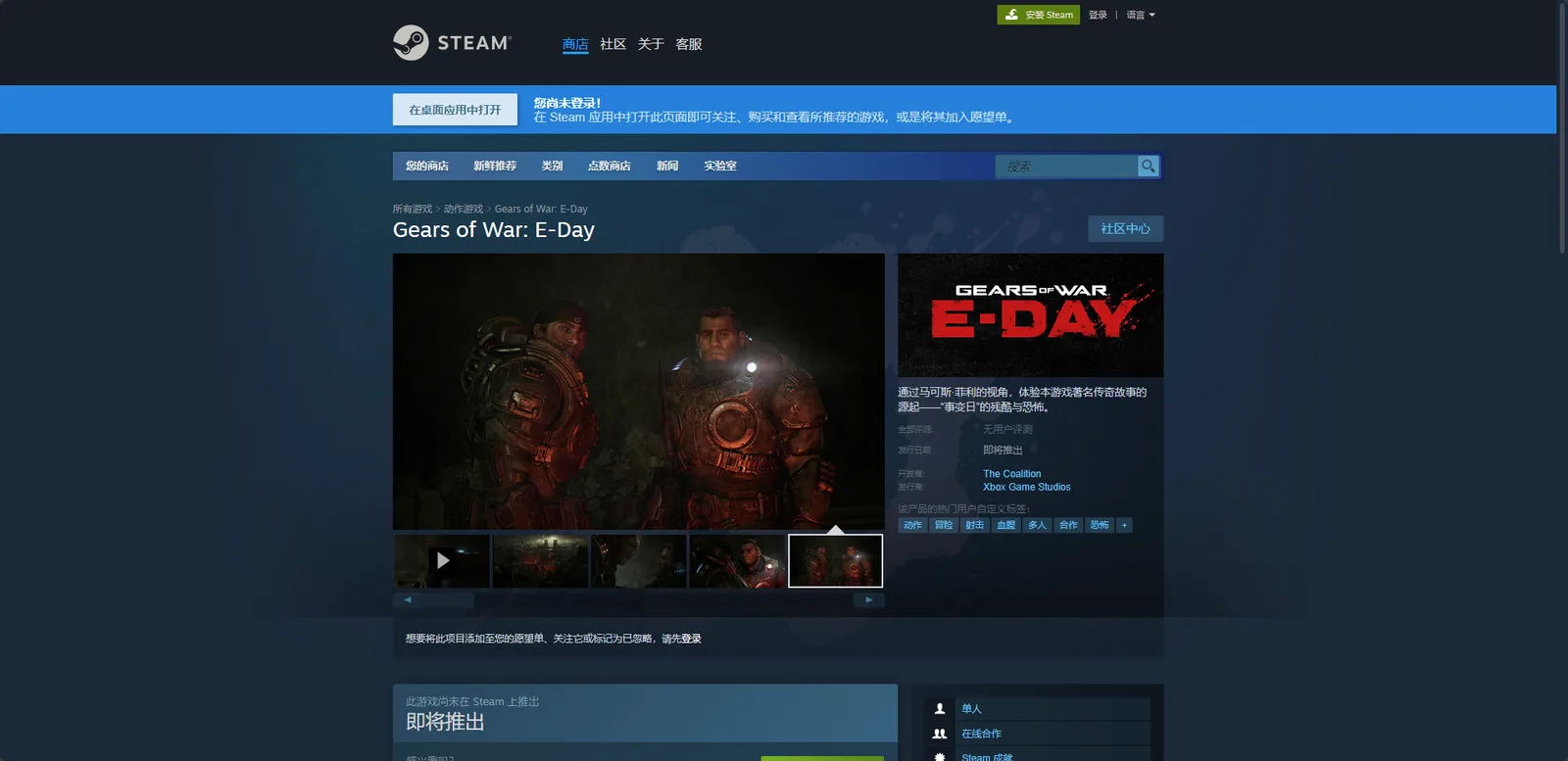
This pre-release Steam page identifies E-Day. Its pictured coming-soon notice is historical; the standard release followed on October 6, 2026.
Is Gears of War: E-Day Available on Steam
Gears of War: E-Day has a full Steam release. This is not merely a store wish-list page, beta registration, or announcement for a later launch. As of October 9, 2026, the October 6 standard release date has passed, and the game is described as available on Steam.
The correct full-game identifier is useful because searches can surface old announcements and related products:
| Listing | Identifier | Current meaning |
|---|---|---|
| Gears of War: E-Day full game | Steam app 3010850 | The released retail game |
| Gears of War: E-Day Beta | Steam app 4059240 | The separate historical beta application |
| Other Gears games | Different app IDs | Separate products and purchases |
The title of a search result is not enough to establish that you have found the retail game. Confirm the product name and app ID before paying, downloading a large installation, or following troubleshooting instructions. Advice written for the beta may refer to a different build, a limited set of content, temporary access rules, and specifications that were explicitly described as beta specifications rather than final launch requirements.
The released PC version places the game’s origin story on Steam, but availability alone does not answer every purchase question. Check the current regional price, language list, retail PC requirements, third-party notices, and entitlement terms on Steam’s live listing. These purchase details depend on the storefront and account; an announcement that the game is on Steam cannot answer them all.
How to Verify the Correct Steam Product Before Buying
Use a short verification pass instead of relying on a search snippet, a reseller description, or an old news post.
- Confirm the exact title. The listing should be for Gears of War: E-Day, not Gears 5, Gears of War: Reloaded, or the separate E-Day Beta.
- Check app ID 3010850. This is the clearest identifier for the full Steam game when similarly named pages appear in search results.
- Read the edition name beside the purchase option. Do not infer included cosmetics, currency, or upgrade rights from a thumbnail or an abbreviated cart line.
- Check the price shown to your Steam account. A US Xbox Store price is not evidence of the current Steam price, your regional currency, local tax, or a promotion.
- Review the current PC requirements. The official beta announcement warned that its listed specifications were for the beta and were not the final launch specifications. Do not use that historical table as your launch purchasing standard.
- Check language and accessibility fields directly. Choose using the language and accessibility fields shown by the current Steam listing rather than an assumption based on another Gears game.
- Review the refund terms displayed for your transaction. Store policy eligibility can depend on the product, purchase channel, play time, timing, and jurisdiction.
This check is especially important if you reached Steam through a web search. An old beta article can still describe pre-downloads, early-access weekends, rewards, and a subset of launch content. Those details were tied to temporary August test periods and do not describe a new October beta or the ordinary retail purchase now.
A third-party Steam key is also not automatically equivalent to buying from the game’s Steam page. A key seller may impose its own region, activation, refund, and delivery conditions. The fact that the full game exists on Steam does not authenticate an individual reseller or prove that a particular key works in your country. Verify those terms at the point of purchase rather than transferring assumptions from the official product listing.
Steam Ownership Is Separate from Xbox and Game Pass Access
A Steam purchase should be treated as a Steam entitlement. The current platform information does not establish that buying the game on Steam also grants an Xbox console copy or a Microsoft Store PC copy.
Xbox Play Anywhere is identified on Microsoft’s purchasing route. That label should not be extended to the Steam version without an explicit entitlement statement. In practical terms, owning the game through one storefront does not by itself prove ownership through another storefront, even when both versions run on Windows PCs or use related online services.
Game Pass is another access route rather than proof of permanent Steam ownership. Official messaging covers Game Pass Ultimate and PC Game Pass, but that does not place a Steam license in your library. If your subscription ends or the applicable catalog terms change, your continued access follows the subscription and store rules attached to that route. Buying on Steam instead follows the Steam transaction attached to your account.
Use this decision rule:
- Choose Steam if you specifically want the game owned and managed in your Steam library.
- Choose a Microsoft PC or Xbox route only after checking the entitlement and device coverage shown for that purchase.
- Choose Game Pass access if the subscription route meets your needs, while recognizing that it is not the same transaction as purchasing a Steam copy.
- Do not buy twice solely because the storefront names differ; first check which account currently grants your access and which device you intend to use.
These distinctions also matter when diagnosing a missing install button. Confirm that you are signed into the same Steam account that completed the transaction. A Microsoft Store receipt, Xbox entitlement, or Game Pass membership does not by itself explain why the full game is absent from a Steam library.
Do Not Confuse the Retail Game with the Open Beta
The Steam open-beta information describes two August 2026 test windows. Early access ran from August 6 to August 10 for eligible pre-orders and qualifying Game Pass members, while the second weekend ran from August 13 to August 17 for players on eligible platforms regardless of pre-order status.
Both periods ended before the October retail launch. There is no supported basis for treating those dates as an active October beta.
The beta included only a subset of launch content. It offered Horde Siege and refined 4v4 Versus play, along with temporary challenges that could unlock specified rewards for the beta and later inventory at launch. Those historical details do not mean that installing an old beta application now grants access to the released game.
If Steam search or your library shows both entries, use these checks:
- Select app 3010850 when you intend to install or purchase the full game.
- Treat app 4059240 as the separate beta application.
- Do not apply the beta PC specification table to the final game without comparing it with the current retail requirements.
- Do not expect a past pre-order access window to provide an extra benefit after the standard release.
- Do not interpret old beta reward instructions as a currently active event unless the game presents a new, dated announcement.
What to Know About Steam Deck Performance
The clearest available Steam Deck test is negative. SteamDeckHQ reported that Gears of War: E-Day booted and could be played on Steam Deck, but it regularly dropped below 30 FPS even on the lowest possible settings. Based on that test, the reviewer did not recommend playing it on the Deck.
That distinction matters: booting is not the same as delivering a stable or recommended experience. A title may reach its menus and load gameplay while still falling short because of sustained frame-rate drops. Lowering every graphics option also did not solve the reported problem in this case.
Treat the result as a dated performance observation rather than an eternal compatibility ruling. It does not prove that every SteamOS version, Proton build, game patch, thermal state, or later hardware revision will produce identical numbers. It also does not provide a supported claim about specific battery life, resolution, upscaling mode, frame pacing, or a locked frame-rate configuration.
If Steam Deck is your only intended device, the safest pre-purchase process is:
- Check the current compatibility information shown on the Steam listing.
- Look for game updates released after the reported test.
- Distinguish reports from the original Steam Deck from tests on other handheld PCs.
- Require sustained gameplay evidence, not only a successful launch or menu screenshot.
- Check demanding combat scenes rather than judging performance from quiet opening areas.
- Keep the applicable transaction and refund conditions in mind before exceeding their limits.
Do not convert the report into a claim that the game never runs. It reportedly does boot and enter gameplay. The actionable problem is that performance dropped below 30 FPS regularly at the lowest settings, making the tested experience unsuitable for a recommendation.
What the Steam Version Lets You Expect
The Steam release is the Windows PC version of Gears of War: E-Day. The campaign returns to Marcus Fenix and Dominic Santiago at the beginning of the Locust war. Reported campaign play retains the series’ third-person cover shooting and active-reload rhythm, while adding weapon modifications found through Hard Cases and side objectives.
Those campaign details help identify the product, but they should not be used to infer unsupported Steam-specific features. The available information does not establish a Steam-exclusive campaign, Steam-to-Xbox cross-buy, a particular Steam price, or guaranteed Steam Deck performance. It also does not confirm a specific DRM scheme: Easy Anti-Cheat and Denuvo are different technologies, and the official product information does not disclose Denuvo use or absence.
Online access conditions can also differ by platform. Microsoft states that console online campaign co-op, Horde Siege, Versus, and other online multiplayer require a plan that includes console online multiplayer. That console requirement should not be copied into a Steam purchasing claim without checking the current PC service terms shown to the player.
For a Steam buyer, the reliable conclusion is narrower and more useful: the retail PC game is available under app 3010850, the beta is a separate historical application, and the Steam license should not be assumed to include Microsoft Store or Xbox ownership.
Final Steam Purchase Checklist
Before paying or starting a large download, confirm all of the following on the current listing:
- The product is Gears of War: E-Day.
- The full-game identifier is 3010850.
- You are not looking at beta app 4059240.
- The displayed edition contains what you intend to buy.
- The current price, tax, currency, and region match your account.
- The live launch requirements fit your Windows PC.
- The displayed language support meets your needs.
- Any third-party key is valid for your region and chosen Steam account.
- You are not assuming Xbox Play Anywhere or Game Pass creates a Steam entitlement.
- You have accounted for the reported sub-30-FPS Steam Deck performance if a Deck is your target device.
With those checks complete, the main answer is straightforward: Gears of War: E-Day has released on Steam, and app 3010850 is the full game. The remaining decision is whether the live regional offer and your Windows hardware—not an old beta page or an assumed cross-buy benefit—make that Steam version the right purchase for you.