
The Gears of War: E-Day Premium Edition Upgrade is a $30 add-on on the US Xbox Store. It does not include the base game. The Microsoft listing requires either a separately purchased copy of Gears of War: E-Day or an Xbox Game Pass Ultimate membership, and it supports Xbox Series X|S and PC.
The upgrade still provides its digital content: the Bravo Squad Signature Weapon Pack, five seasonal customization packs beginning with the Emergence Pack, and 1,000 Iron. However, its up-to-five-day early-access period ended when the standard release arrived on October 6, 2026. Buying the upgrade now does not restore those early-access days.
What the Premium Edition Upgrade is now
The upgrade is an add-on for players who already have a way to launch the base game. On the current US Xbox Store listing, it costs $30 and is marked as requiring a game. Purchasing it gives your account the premium content entitlements, but it does not create permanent ownership of Gears of War: E-Day itself.
That distinction matters most if you plan to play through a subscription. An active Xbox Game Pass Ultimate membership satisfies the requirement stated on the Microsoft upgrade page. If you later lose access to the base game, the upgrade remains an add-on without a game to run. You would need to restore qualifying access or purchase the base game separately.
The confirmed Microsoft Store version works with Xbox Series X|S and PC. Do not assume that an add-on purchased from one storefront automatically transfers to another storefront. The base game’s Xbox Play Anywhere support establishes a Microsoft purchase route across current Xbox and Windows PC platforms, but it should not be treated as proof that a Steam purchase or Steam add-on is interchangeable with the Microsoft Store version.
What the upgrade includes
The package combines one campaign weapon pack, five seasonal customization packs, and premium currency. It does not list a future expansion, permanent base-game ownership, or a separate multiplayer subscription among its contents.
Bravo Squad Signature Weapon Pack
The Bravo Squad Signature Weapon Pack is for the campaign only. That limitation is important when comparing it with cosmetic content intended for other parts of the game. Do not buy the upgrade expecting the Bravo Squad designs to function as a universal multiplayer weapon-skin set.
Five seasonal customization packs
The upgrade includes five seasonal customization packs in total. The first is the Emergence Customization Pack, followed by four additional packs released as they become available. A purchase grants the included entitlement, but it does not mean that every later pack must already be downloadable on the day you buy the upgrade.
The official edition description says each seasonal customization pack contains:
- Two character skins
- Two weapon skin sets
- Two character poses
- One banner
- One emblem
- One icon
The Emergence Customization Pack is the named launch pack. Its listed contents are:
- Death’s Rendezvous Marcus Fenix Legendary Character Skin
- Bloodied Hunter Tai Kaliso Epic Character Skin
- Death’s Rendezvous Legendary Character Pose
- We Must Improvise Legendary Character Pose
- Death’s Rendezvous Legendary Weapon Skin Set
- Emergence Omen Rare Weapon Skin Set
- Emergence Omen Banner and Emblem
- Death’s Rendezvous Icon
The four remaining seasonal packs are included in the upgrade, but their availability follows their release schedule. Avoid treating a missing unreleased pack as proof that the entire upgrade failed to attach to your account.
1,000 Iron
The package includes 1,000 Iron, identified as premium in-game currency. The upgrade listing treats this as one of the bundled add-ons rather than part of the base-game license. The upgrade listing does not establish a cash value outside the bundle, a refund value, or any additional bonus beyond the stated 1,000 Iron.
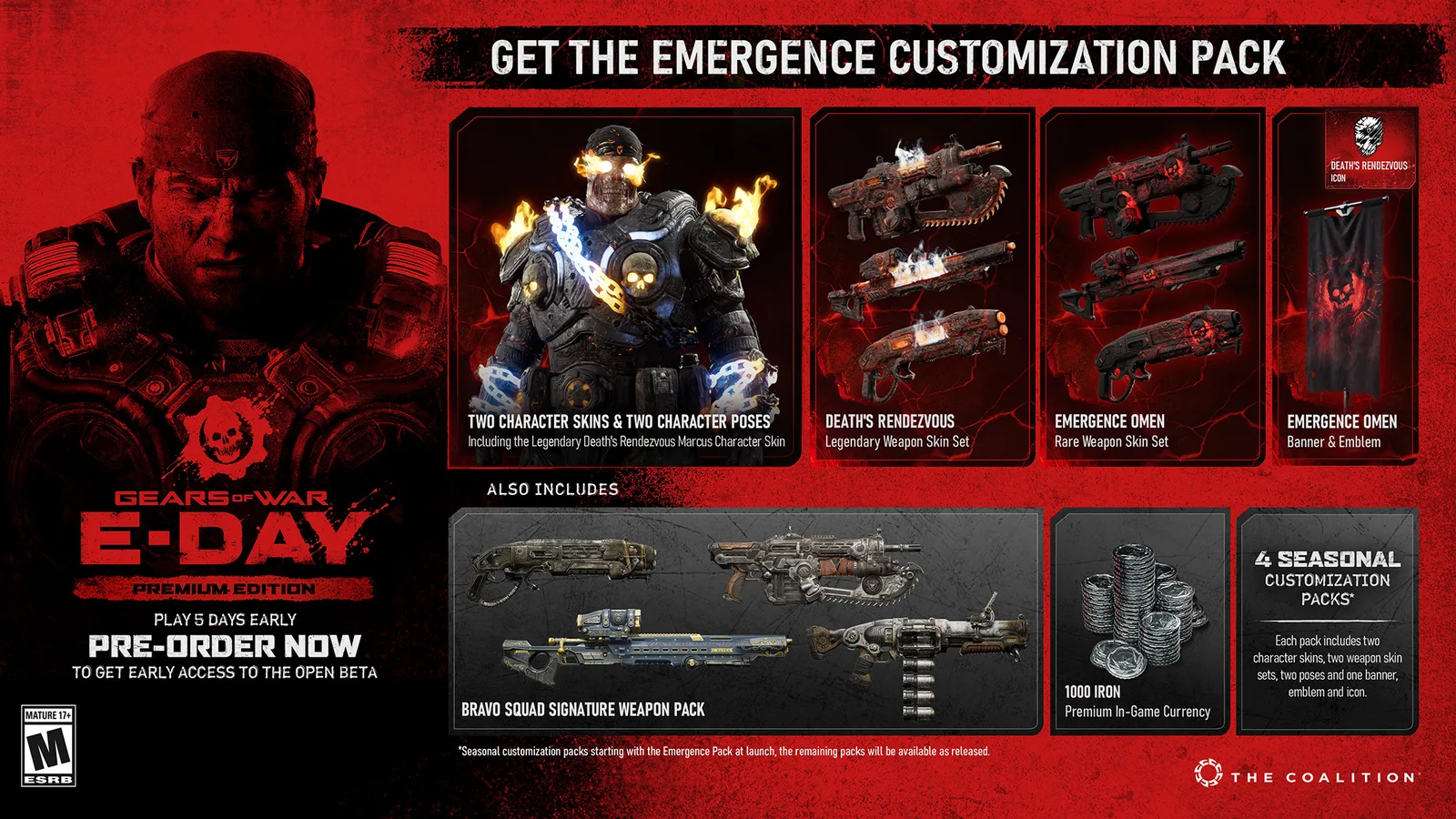
Official promotional artwork for the Premium Edition content package.
How the Upgrade compares with the other digital choices
The right comparison depends on whether you already own or can access the base game. These are the US Xbox-page prices listed on October 9, 2026; taxes, regional pricing, future discounts, and Steam pricing may differ.
| Option | US listed price | Base game included | Premium content included | Best fit |
|---|---|---|---|---|
| Standard Edition | $69.99 | Yes | No | Players who only want permanent base-game ownership |
| Premium Edition Upgrade | $30.00 | No | Yes | Eligible owners or Xbox Game Pass Ultimate members adding premium content |
| Premium Edition | $99.99 | Yes | Yes | Players who need both the base game and premium content in one digital package |
At those listed prices, buying the $69.99 base game and the $30 upgrade separately totals the same $99.99 shown for the Premium Edition before taxes. The practical difference is entitlement structure: one route combines a base-game purchase with a separate add-on, while the Premium Edition packages the digital base game and premium benefits together.
If you already own the standard digital game through Microsoft, the upgrade avoids buying the base game again. If you only have subscription access, the upgrade can add premium content, but it does not convert that subscription access into permanent ownership. If you have neither the game nor qualifying access, the standalone upgrade cannot be used by itself.
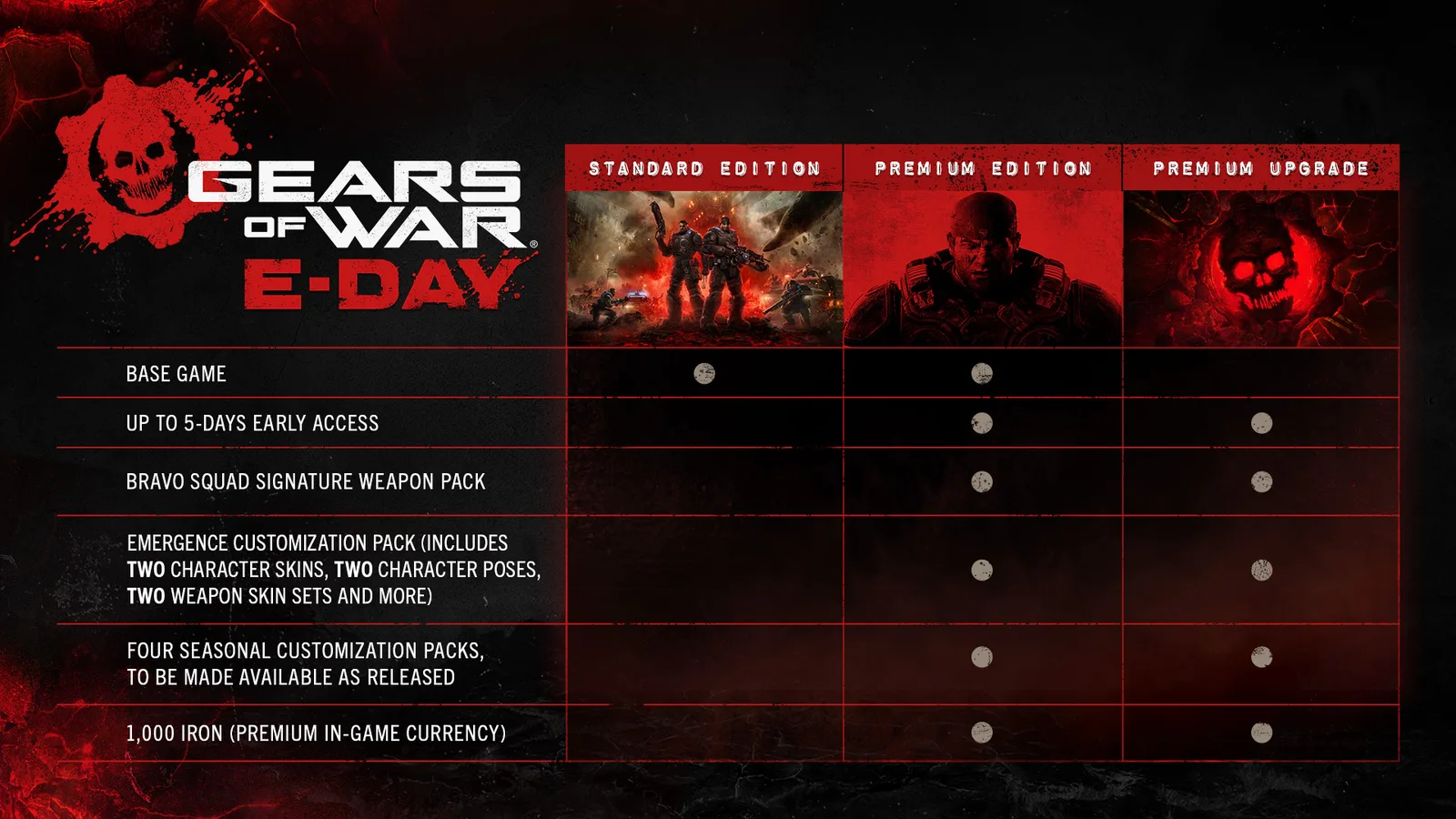
Official comparison of the base game and Premium Edition benefits.
Which launch benefits have expired
The upgrade originally advertised up to five days of early access beginning October 1, ahead of the October 6 global standard release. That period is over. As of October 9, every eligible base-game player can access the released game, so early access provides no remaining time advantage.
The wording “up to five days” described a launch window, not five flexible bonus days that begin whenever an individual purchases the add-on. A post-launch buyer receives the continuing digital content but cannot rewind the release calendar.
The earlier pre-order offer should also be kept separate from the current upgrade contents. Before launch, pre-ordering an eligible edition could provide an Exfil Dom Legendary Character Skin and an Exfil Legendary Weapon Skin Set. Those items are not named in the current Xbox Store upgrade bundle. Do not count them as guaranteed content when buying after release unless your own checkout page explicitly includes them.
The August open-beta benefit is historical as well. It was a limited pre-release access benefit and is not an active October game mode or a reason to purchase the upgrade now.
This leaves four continuing reasons to consider the add-on:
- The Bravo Squad campaign weapon pack
- The Emergence Customization Pack
- Four additional seasonal customization packs as released
- 1,000 Iron
Evaluate the $30 price against those continuing items, not against expired early access, a completed beta, or an unconfirmed pre-order reward.
How to check eligibility before buying
Use this sequence to avoid purchasing an add-on without a compatible route to the game.
-
Identify how you access the base game. Confirm whether you purchased Gears of War: E-Day or rely on Xbox Game Pass Ultimate. The Microsoft upgrade page explicitly requires one of those two options, sold separately.
-
Check the storefront and account. Make sure the base game and upgrade will be used through a compatible Microsoft account and purchasing route. Do not assume that owning the game on Steam automatically satisfies the entitlement check for the Xbox Store add-on, or that an Xbox Store upgrade will attach to a Steam copy.
-
Treat PC Game Pass cautiously. General launch information advertises the base game through Game Pass Ultimate and PC, but the detailed Microsoft upgrade SKU specifically names the base game or Xbox Game Pass Ultimate membership. If you only use PC Game Pass, rely on the eligibility message shown for your account at checkout rather than assuming it matches the Ultimate requirement.
-
Confirm that you are buying an add-on. The listing should identify the Premium Edition Upgrade and state that it requires a game. If you need permanent base-game ownership too, compare the Premium Edition or a separate base-game purchase before paying.
-
Check the displayed platform. The confirmed Xbox Store listing names Xbox Series X|S and PC. Match the product to the platform and account on which you intend to play.
-
Review the current price and region. The $30 figure is the checked US Xbox Store price, not a guarantee for every country, tax jurisdiction, retailer, or future sale. Use the final amount shown by your storefront.
-
Read the included-content list at checkout. Confirm that it names the Bravo Squad Signature Weapon Pack, five seasonal customization packs beginning with Emergence, and 1,000 Iron. Do not substitute memories of pre-launch advertising for the current transaction details.
-
Separate access from ownership. If Ultimate is your only route to the base game, understand that the upgrade does not replace that route. Losing qualifying base-game access leaves you with premium add-on entitlements but no standalone game license.
Common Premium Edition Upgrade mistakes
Expecting the base game
The most consequential mistake is treating the $30 product as a discounted copy of Gears of War: E-Day. It is not. The Store labels it as content that requires a game, and the base game is sold separately.
Buying it for early access after launch
October 1 early access and the October 6 standard launch have both passed. The upgrade’s continuing content may still matter to you, but the five-day head start no longer has value.
Counting the pre-order skins as current bundle contents
The Exfil Dom skin and Exfil weapon set belonged to the pre-order offer. The current upgrade bundle lists other content and does not establish those pre-order rewards as a guaranteed post-launch purchase benefit.
Expecting all seasonal packs immediately
The package begins with the Emergence Pack, while the other four packs are released as available. The entitlement covers all five, but delivery is staged rather than necessarily simultaneous.
Using the Bravo Squad pack for the wrong mode
The Bravo Squad Signature Weapon Pack is restricted to the campaign. It should not be valued as a promised Horde Siege or Versus customization set.
Assuming the upgrade covers online access
The add-on does not include a multiplayer subscription. On console, online campaign co-op, Horde Siege, Versus, and other online multiplayer features require a plan that includes console online multiplayer. That requirement is separate from owning the upgrade.
Assuming Microsoft and Steam purchases are interchangeable
Gears of War: E-Day is available through Microsoft’s Xbox and PC route as well as Steam, but that does not prove cross-store add-on ownership. Buy the upgrade in the ecosystem where your compatible base-game access is recognized, and verify the storefront’s own entitlement message before checkout.
What to verify after purchase
Start with the transaction record. It should identify the Gears of War: E-Day Premium Edition Upgrade rather than the base game, an individual customization pack, or a currency-only product. Retain the receipt and make sure the purchase appears on the same account you use for the game.
Next, inspect the upgrade’s bundle or add-on list. The Microsoft listing separates the included items into 1,000 Iron, the Bravo Squad Signature Weapon Pack, the Emergence Customization Pack, and four numbered customization packs. Some later packs may remain unavailable until released, so distinguish an unreleased item from a missing launch entitlement.
If the base game will not launch, check the base-game requirement before blaming the premium content. The upgrade alone cannot start Gears of War: E-Day. Confirm that your purchased game or qualifying Ultimate membership is active on the account and platform you are using.
If the game launches but a continuing premium item is absent, compare what is missing with the package terms. Bravo Squad content belongs to the campaign, while seasonal customization content and Iron are separate bundle elements. This distinction helps you identify whether you are looking in the wrong context or whether a specific entitlement needs attention.
The post-launch buying decision
Buy the Premium Edition Upgrade if you already have compatible access to Gears of War: E-Day and value the campaign weapon pack, five seasonal customization packs, and 1,000 Iron at the displayed price. It is also a direct route for a qualifying Xbox Game Pass Ultimate member who wants those premium items without purchasing the base game immediately.
Skip it if your main reason was the five-day early-access window, the August beta, or an assumed pre-order reward. Those benefits either ended before the current date or are not guaranteed by the current upgrade listing. Also skip the standalone add-on if you still need a permanent base-game license and prefer a single combined purchase; compare the full Premium Edition instead.
The decisive question is no longer how early the upgrade lets you play. It is whether its continuing campaign pack, seasonal cosmetics, and 1,000 Iron are worth $30 while your separate base-game access remains valid.