
The 8BitDo Gears of War E-Day Charging Dock is an officially licensed wireless charging stand for Xbox Series X|S and Xbox One wireless controllers. It includes the rechargeable battery pack needed for drop-and-charge operation, works with the controller’s original battery door, and takes approximately 3.5 hours to charge under the listed specifications.
The main limitation is compatibility: the published list specifically names Xbox Series X|S and Xbox One controllers. Do not assume unlisted Elite, third-party, Xbox 360, or non-Xbox controllers will work. The package also does not include a controller or power adapter. You receive the dock, one 1000mAh rechargeable battery pack, and a USB cable.

Official product overview showing the matching controller and dock design.
Compatibility at a glance
The dock was visually designed to accompany the Gears of War: E-Day Limited Edition Xbox Wireless Controller, but that special-edition controller is not required. Its charging support extends to the two standard Xbox controller families listed below.
| Controller or device | Published support | What to check |
|---|---|---|
| Xbox Series X|S wireless controller | Yes | Install the included 8BitDo battery pack before docking |
| Xbox One wireless controller | Yes | Install the included 8BitDo battery pack before docking |
| Gears of War: E-Day Limited Edition Xbox Wireless Controller | Yes | It belongs to the supported Xbox wireless-controller family and is the intended visual match |
| Xbox Elite controllers | Not established | Verify the exact model before ordering |
| Third-party Xbox controllers | Not established | Xbox branding alone does not confirm physical or charging compatibility |
| Xbox 360 controllers | Not listed | Do not treat Xbox One support as Xbox 360 support |
| PlayStation, Switch, or other controllers | Not listed | This is an Xbox-specific charging product |
Compatibility refers to the controller hardware, not the platform on which a game is running. Using an Xbox controller with a PC does not change how the dock charges it, but the controller still needs to be one of the supported models and use the included charging battery pack.
The dock is therefore a practical choice if you already own a compatible Xbox wireless controller and want a display stand that also keeps it charged. It is not a universal charging pad, and it should not be purchased solely because an unsupported controller has a similar shape.
What comes in the box
The package contains three listed items:
- One 8BitDo Ultimate Charging Dock for Xbox Controllers in the Gears of War: E-Day design
- One rechargeable 1000mAh semi-solid-state lithium battery pack
- One USB cable
A power adapter is not included. Plan to provide a suitable 5V USB power source separately. The controller, game, console, and other Gears of War accessories are also absent from the listed contents.
The included battery pack is essential to the charging system. The dock does not recharge ordinary disposable batteries or an unrelated battery pack simply because they fit inside an Xbox controller. Install the supplied 8BitDo pack and retain the controller’s original battery door, as the product is specifically designed to work without replacing that door with a special exposed-contact cover.
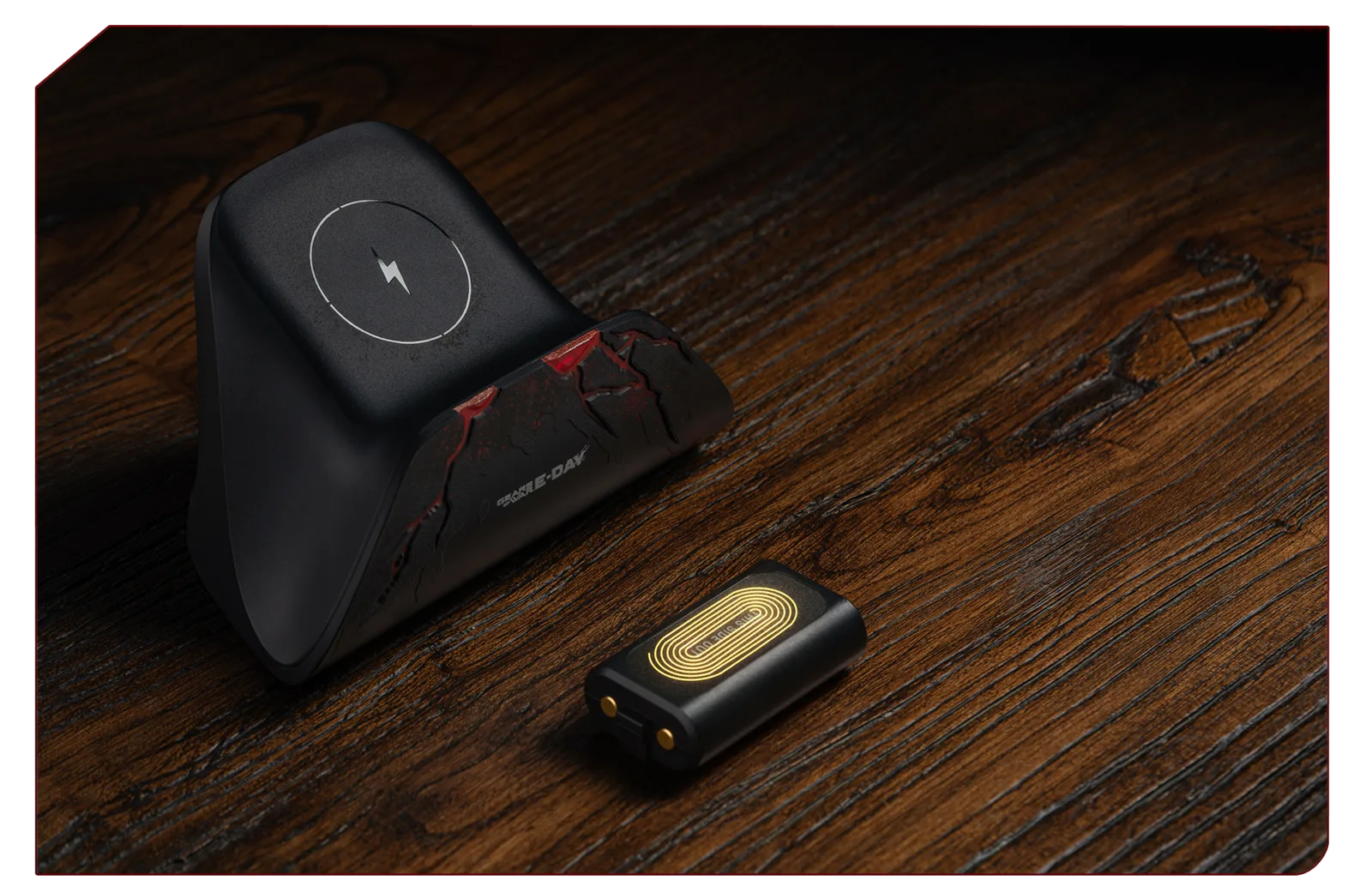
The included battery pack is shown beside the charging dock.
How to set up the charging dock
Setup is short, but the order matters because the battery pack creates the wireless charging connection between the controller and dock.
- Confirm the controller model. Use an Xbox Series X|S or Xbox One wireless controller. If the exact model is not on the published compatibility list, verify it before opening or discarding the packaging.
- Open the controller’s battery compartment. Remove any disposable batteries or other removable battery pack currently installed.
- Install the included 8BitDo battery pack. Seat the rechargeable pack inside the battery compartment as intended for the controller.
- Replace the original Xbox battery door. No alternate battery door is listed as necessary. Make sure the original door closes normally rather than forcing it over a poorly seated pack.
- Position the dock on a stable surface. Leave the airflow channels unobstructed. The dock uses passive cooling and does not contain an internal fan.
- Connect the supplied USB cable. The dock operates at 5V, but the package does not contain a power adapter. Connect it to an appropriate USB power source.
- Lower the controller onto the dock. Magnetic alignment helps guide the controller into its charging position. Charging begins automatically when the equipped controller is seated correctly.
- Allow approximately 3.5 hours for charging. This is the listed approximate charging time, not a guarantee for every power source or starting battery level.
You do not need to align exposed contact pins. That is the central convenience of this model: after the 8BitDo battery pack is installed, placing the controller on the dock initiates charging without opening the battery compartment again.
How magnetic wireless charging works
The dock combines magnetic alignment with the installed wireless charging battery pack. The magnets help place the controller consistently, while the compatible pack receives power without external pins that must be manually lined up.
For routine use, finish playing and return the controller to the dock. The stand then serves as both a display position and a charging location. The E-Day edition’s battle-worn black-and-red styling is coordinated with the limited-edition controller, although supported standard Xbox controllers can still use the charging function without matching the artwork.
If charging does not begin, check the hardware path before assuming the battery is faulty:
- Confirm that the controller belongs to a listed Xbox family.
- Confirm that the included rechargeable pack, rather than disposable cells or another pack, is installed.
- Reseat the pack and close the original battery door fully.
- Confirm that the USB cable is connected to the dock and a suitable 5V power source.
- Lift the controller and place it on the dock again so the magnetic alignment can settle it into position.
- Watch for a flashing alert, which may indicate that a protection condition has been detected rather than normal charging.
The available specifications do not define every normal status-light color or pattern. Do not invent a meaning for an undocumented light. A flashing protection alert is specifically associated with listed fault conditions, so persistent flashing deserves attention rather than being treated as a normal full-battery signal.
Battery and dock specifications
The following values distinguish the battery’s protection limits from the dock electronics. They should not be combined into a single generic rating.
| Specification | Battery pack | Charging dock |
|---|---|---|
| Battery type | Rechargeable semi-solid-state lithium | Not applicable |
| Capacity | 1000mAh | Not applicable |
| Approximate charging time | 3.5 hours | Not applicable |
| Operating voltage | 5V | 5V |
| Dormant voltage | Not listed | 5V |
| Overvoltage protection | 6.5V | 6V |
| Overcurrent protection | 500mA | 1.5A |
| Overheating protection | Battery pack at or above 45°C | PCB at or above 50°C |
| Additional response | Full-charge detection after four hours, flashing LED alert, and automatic power-off | Flashing LED and automatic power-off for listed faults |
8BitDo lists the dock at 121.3 × 74.8 × 73.7mm and 200g. These are the manufacturer’s specifications for the dock, rather than the combined size or weight of a dock, seated controller, and shipping package. Measure the intended desk or shelf space using the dock dimensions and allow additional clearance for the controller.
The approximate 3.5-hour charge duration and the four-hour full-charge detection are separate specifications. The first describes the expected charging time. The second belongs to the overcharge-protection behavior and should not be interpreted as a promise that every depleted battery will always finish at exactly four hours.
Protection features and flashing alerts
The charging system includes separate safeguards for the battery pack and the dock. The battery specifications list overvoltage, overcurrent, overheating, and overcharge protection. The dock specifications list automatic power-off and an LED flash for short circuit, overcurrent, overvoltage, reverse polarity, or overheating.
These protections reduce risk, but they are not reasons to ignore repeated alerts. If the LED flashes persistently or the unit stops charging, remove the controller from the dock and check the setup. Confirm that the supplied pack is seated correctly, that the controller is supported, and that the dock is connected to an appropriate 5V source. Do not repeatedly reseat the controller while the same warning continues without identifying the cause.
The two temperature figures are protection thresholds, not suggested operating targets. The battery-pack protection is listed at 45°C or above, while the dock PCB protection is listed at 50°C or above. Normal placement should leave the dock’s airflow channels open rather than pressing it against material that blocks passive heat release.
The listed full-charge protection detects a full state after four hours, produces a flashing LED alert, and powers off automatically. Because other faults can also produce flashing and shutdown behavior, interpret an unexpected alert in context instead of assuming every flash means the battery is full.
Passive cooling and desk placement
The dock releases heat through engineered airflow channels and has no internal fan. That makes fan noise irrelevant, but it also makes physical placement important. Put the unit on a firm, level surface with space around its vents. Avoid covering the base or surrounding it with objects that obstruct natural airflow.
Its compact 121.3 × 74.8 × 73.7mm footprint should fit on most controller shelves and desks, but measure the intended location if the controller will sit beneath a monitor riser or inside a narrow cabinet. Remember that the published dimensions describe the dock itself; the seated controller requires additional clearance above and around it.
The cracked-earth, battle-worn finish is not merely a generic Gears logo applied to a standard-looking stand. Its design language was created to complement the E-Day controller and evoke the damaged surface and red accents associated with Emergence Day. That visual pairing is the main reason to choose this edition over a purely functional charging solution.
Buying status, price, and date limitations
As of October 9, 2026, the 8BitDo shop listed the dock at $39.99 USD and named October 20, 2026 as its shipping date. Its page also displayed inconsistent purchase-state signals, including a sold-out label alongside purchase controls. Treat the price and ship date as a dated listing, not a guarantee of immediate stock or delivery.
A separate retailer listed a €34.90 preorder with a preliminary October 16 date and no available inventory. That earlier date does not override the manufacturer shop’s October 20 statement. Retailer dates can be regional, preliminary, or inventory-specific, so use the final checkout estimate for the store and destination country where you are actually ordering.
Do not rely on an older social post title that mentions October 9 shipping. The stronger current product listing gives October 20, and the conflicting date is not sufficiently supported. Taxes, shipping fees, regional availability, and future restocks are also not established by the base US price.
Before paying, verify all of the following on the live product page or checkout screen:
- The listing names the Gears of War: E-Day edition rather than another 8BitDo dock.
- Your controller is an Xbox Series X|S or Xbox One wireless controller.
- The package includes the 1000mAh 8BitDo charging battery pack.
- You already have, or plan to supply, a suitable 5V USB power source.
- The displayed stock status allows an order rather than only a preorder or notification request.
- The delivery estimate applies to your country and retailer.
- The final price includes any regional tax and shipping costs that matter to your purchase.
Who this E-Day charging dock is for
The dock is best suited to someone who owns a supported Xbox wireless controller, wants automatic drop-and-charge operation, and values the coordinated E-Day display design. It is especially coherent beside the limited-edition controller, but the charging function is not restricted to that cosmetic model.
It is a weaker fit if you need confirmed Elite-controller support, a universal multi-platform charger, an included wall adapter, or compatibility with a third-party gamepad. Those capabilities are not established by the published specifications. It is also unnecessary if you do not want to replace your current disposable batteries or removable pack with the included 8BitDo rechargeable battery.
For a supported Xbox Series X|S or Xbox One controller, the complete path is straightforward: install the supplied 1000mAh battery pack, keep the original battery door, connect the dock to a suitable 5V USB source, and place the controller onto the magnetic charging position. Once those conditions are met, the dock provides the advertised cable-free controller placement, passive cooling, and approximately 3.5-hour charging cycle in an E-Day-themed stand.
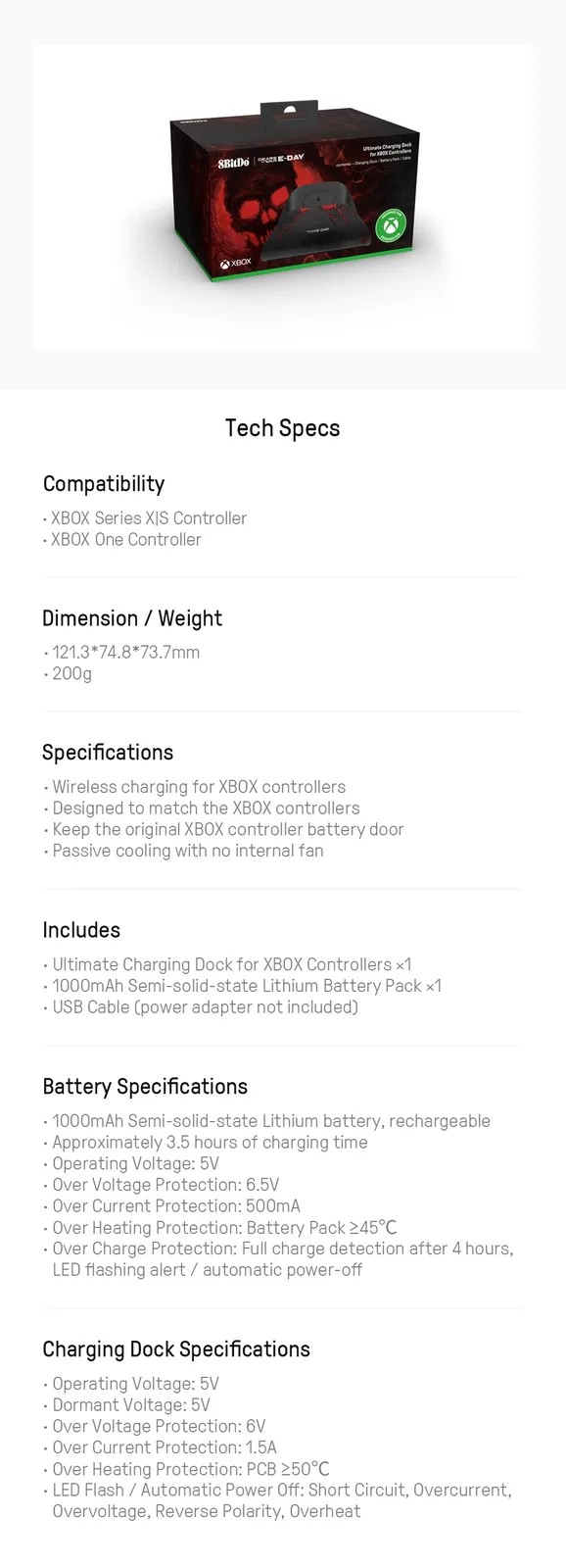
The official shop specifications panel lists the dock dimensions.