
Gears of War: E-Day is rated Mature 17+ by the ESRB. Its official content descriptors are Blood and Gore, Intense Violence, and Strong Language. The record also lists Users Interact and In-Game Purchases as interactive elements. As of October 9, 2026, the detailed rating summary is available for this specific release; the answer is more complete than the age badge alone.
For a buying decision, separate three questions: whether the depicted content is suitable, whether the player should use connected features, and whether spending should be permitted. An age label does not answer all three. The confirmed record gives you a starting point for each, while household rules and account settings determine what access you choose to allow.
The official record at a glance
| Field | Confirmed information |
|---|---|
| Game | Gears of War: E-Day |
| Publisher | Microsoft |
| Listed platforms | Windows PC and Xbox Series |
| Rating category | M, for a mature audience aged 17 and older |
| Content concerns | Graphic blood and bodily injury, forceful violence, and strong profanity |
| Interactive notices | Interaction with other users and purchases within the game |
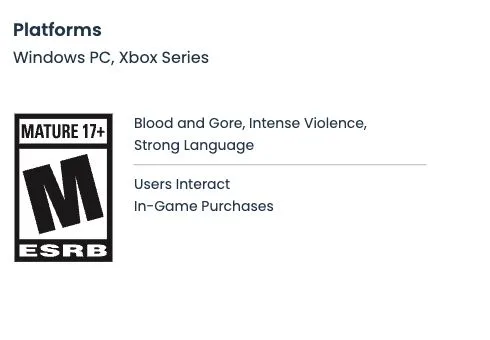
The ESRB record for Gears of War: E-Day as displayed on October 9, 2026.
The platform wording belongs to the ESRB record. It identifies the rated product and should not be converted into a promise about every Xbox model, PC specification, storefront, or regional purchase. Check the game's product listing separately for device compatibility and ownership requirements.
The three content descriptors and the two interactive notices describe different things. The content descriptors concern the material presented in the game. The interactive notices concern connected participation and purchasing opportunities. Neither set replaces the other: a player can encounter mature campaign content without taking part in an online conversation, and an account can require a spending decision independently of the violence shown on screen.
What the detailed rating summary describes
The summary describes a third-person shooter in which soldiers protect civilians in an invaded city while fighting hostile creatures. Players use firearms, grenades, and close-range attacks. Combat includes conspicuous blood, bodily dismemberment, executions, and further damage to bodies. Cinematic sequences also depict severe injuries and deaths. Strong profanity appears in the dialogue.
This description establishes the nature of the rated content without turning the page into a scene-by-scene spoiler list. It does not specify how frequently each example occurs, provide a complete inventory of dialogue, or quantify how long a player sees graphic imagery. Treat those questions as separate from the confirmed categories.
Decide which content concern matters most
A household rule based only on the age category produces a straightforward result: this release is classified for a mature audience. A rule based on a particular kind of imagery needs a more specific decision. Identify the concern first rather than treating every mature-content label as interchangeable.
If graphic injury is the deciding factor, the summary confirms that the concern extends beyond a small amount of blood. Avoid assuming that combat becomes suitable merely because the enemies are fictional creatures or the camera uses a third-person perspective. Neither fact removes the bodily violence described in the record.
If language is the deciding factor, the record confirms strong profanity but does not provide a reliable frequency count. Do not recast that statement as occasional, constant, restricted to cinematics, or avoidable through a particular menu option. No game-specific language filter has been established by the rating record.
If cinematic violence is the deciding factor, distinguish it from ordinary moment-to-moment combat. The summary addresses both. Watching a quiet gameplay clip, a menu, or an edited promotional trailer cannot establish the content of every cinematic sequence. A brief preview may help you understand presentation, but it cannot erase an explicit rating concern.
Write down the actual household boundary before purchasing: an age threshold, avoidance of graphic injury, a language limit, or another specific concern. That gives you a concrete decision to make. A favorable review, a familiar franchise name, or a friend's recommendation does not change the rating category or make a particular content concern disappear.
What interaction with other users means for your decision
The official interactive notice confirms that the release includes a way for users to interact. It does not supply a complete description of every communication channel, participant, moderation feature, or social experience. Do not infer that every session includes voice chat, that every message is moderated in the same way, or that strangers are excluded automatically.
Before enabling connected play for a younger member of a household, decide who may communicate with that account. Options can differ between an account-level service, the console or PC environment, and a game's own settings. Check the controls actually present in the account and device you will use rather than following a guessed E-Day menu path.
A practical communication check has four parts:
- Identify whether the account will play alone, with known friends, or with people outside the household's approved group.
- Review the available communication and invitation permissions on the relevant account and device.
- Confirm which permissions apply to the intended play session instead of assuming that one restriction covers every service.
- Agree on what the player should do when an unwanted invitation, message, or conversation appears.
If the desired restrictions are absent or unclear, leave the connected feature disabled until you understand the available control. Do not promise that a setting exists merely because another Xbox game has it. This guide does not establish the names or location of a specific E-Day privacy menu.
Keep communication concerns separate from the campaign's depicted content. Restricting social access can address who a player meets; it does not remove the mature violence or language described in the rating summary. Likewise, selecting solo play does not change the game's age classification.
What the purchasing notice confirms
The record confirms purchasing opportunities within the game. That notice does not identify every item, current price, payment method, or purchase restriction. It also does not, by itself, confirm paid randomized items. Do not attach a loot-box claim to the game unless an authoritative notice explicitly establishes it.
For a household spending decision, inspect the account that will hold the game and any payment method. Determine whether the account has a stored balance, a saved payment method, or access to purchase approval controls. Check the actual platform options; do not assume the game provides its own password prompt or spending cap.
Use a short pre-play spending review:
- Decide whether additional purchases are allowed at all.
- If spending is allowed, agree on an amount and an approval process before the player opens an offer.
- Review saved payment methods and balances on the account used for play.
- Inspect available purchase restrictions or approval settings and confirm their scope.
- Keep receipts available so a completed transaction can be identified accurately.
- Recheck the controls when changing accounts, devices, or storefronts.
Buying the base game is a separate transaction from allowing later purchases. Owning a more expensive edition also does not mean every possible future item is included. Edition contents should be checked against the product purchased, while the rating notice remains a general signal that spending opportunities exist.
Do not treat a cosmetic item as necessary for resolving a content-suitability concern. The age classification concerns the game, and a purchase does not alter that classification. When a household chooses to limit spending, explain the rule before play rather than expecting a particular offer screen to make the decision for you.
Check account controls without assuming a game menu
A useful setup review starts with the actual account and device. This avoids a common mistake: reading instructions for a different game or storefront and assuming the same controls apply here.
- Confirm which account will launch the game. On a shared device, distinguish the player's account from an adult account that owns purchases or payment methods.
- Check the account's available communication, invitation, and purchase permissions.
- Inspect any relevant family or device controls, noting which account and service each setting covers.
- Confirm that the intended restrictions remain in effect when the player switches accounts or launchers.
- Review the game's visible options for additional controls, using only settings that actually appear in the installed version.
- Revisit the setup if the household changes its rules or adds another device.
Do not interpret a missing control as proof that every type of access is unrestricted. Another layer may provide a relevant permission. Conversely, do not assume that a restriction in one layer automatically covers another. If a setting's description is unclear, consult the platform's current explanation before relying on it.
This review is about choosing access deliberately. It does not claim that this site tested every possible family configuration, that a particular account control is available everywhere, or that any setting makes mature content suitable for all players.
Avoid mixing E-Day with another rating record
Search results can display records for the original Gears of War, an older remaster, another numbered release, or a franchise page. Check the full title and publisher before borrowing any content description.
A matching character, weapon, logo, or series name does not establish a matching rating summary. Different releases can depict different scenes and carry different interactive notices. Use the record for E-Day when deciding about E-Day.
The same care applies to regional classifications. The ESRB record discussed here is the US-facing classification. A badge used elsewhere may belong to another rating organization with its own age categories and terminology. Do not convert that label into an ESRB equivalent or assume a different symbol contradicts this record.
A screenshot is useful when it clearly shows the exact title and the relevant fields. A cropped badge without the game title is weaker identification. If a store card abbreviates the information, return to the complete record rather than filling the missing details from memory.
Make the final household decision
Work through suitability, communication, and spending separately. First decide whether the mature content fits the intended player's situation. Next decide whether connected participation should be allowed and with whom. Finally decide whether additional purchases should be permitted and how approval will work.
You do not need a complete list of every violent scene to apply a rule based on the confirmed age category. If a particular scene type is decisive, however, the short category names alone may be insufficient; use the detailed record and relevant viewing information without assuming that an edited trailer is exhaustive.
Record any conditions attached to the decision. For example, a household might permit play only on a specified account, limit social access to a known group, or require approval before spending. These are household choices, not promises about built-in E-Day features. Verify that the device and account can enforce any condition on which the decision depends.
The reliable answer on October 9, 2026 is that E-Day carries an M rating, with confirmed graphic violence and strong language concerns, plus separate notices about interaction and purchasing. Use that complete record to make a specific decision rather than relying on a franchise reputation, a short store badge, or assumptions about unverified menu controls.