
Gears of War: E-Day is available on Steam for Windows PC, but not every discounted PC listing is a Steam key. Before paying, confirm that the offer explicitly identifies Steam as the activation platform, Key as the product type, your country as an eligible activation region, and the edition you intend to own. An Xbox Live or Xbox Play Anywhere code will not activate on Steam, while a Steam account listing gives you seller-supplied account credentials rather than a code for your own account.
The game was released on October 6, 2026. AllKeyShop’s US-dollar comparison page listed Steam Standard Edition at $69.99 on October 8, 2026 UTC (October 9 in Asia/Shanghai), but marketplace prices, fees, coupons, and stock can change quickly. Treat any price as provisional until the final checkout screen confirms the same platform, product type, region, edition, and total cost.
| Listing field | Correct choice for a normal Steam-key purchase | Main risk to avoid |
|---|---|---|
| Platform | Steam | Xbox Live or Xbox Play Anywhere |
| Product type | Key | Account, unless you knowingly want transferred credentials |
| Region | Your country is explicitly eligible | Europe, United States, or another restricted region that excludes you |
| Edition | Standard or Premium, as intended | Upgrade-only product without the base game |
| Delivery | A product code for your own Steam account | Gift, account, retail shipment, or unclear delivery method |
Official horizontal key art for identifying the base game.
What a Gears of War: E-Day Steam key must include
A Steam key is a product code that you redeem through the Steam client. Successful activation adds the licensed product to the Steam account that redeemed it, after which the game can be downloaded from that account's library. You need a Steam account and the Steam application to complete this process.
The most important word on a listing is not PC. Gears of War: E-Day has more than one PC purchasing route. The official platform list includes Steam, while Microsoft also sells a Windows version through its own ecosystem. A marketplace may therefore place Steam, Xbox Live, and Xbox Play Anywhere offers on the same comparison page. All three can be described as PC products, but they are not interchangeable activation systems.
Use this minimum eligibility test before considering the price:
- The product title names Gears of War: E-Day, not the separate beta or another Gears release.
- The platform field says Steam.
- The type field says Key if you want a code for your existing account.
- The activation notice says the product works in your country.
- The edition includes the base game, unless you already own the base game and deliberately want an upgrade.
- The checkout page preserves all of those details after any seller, coupon, or payment option is selected.
The full game's Steam application identifier is 3010850. That identifier can help distinguish the retail game from the separate beta entry, whose identifier is 4059240. It does not, by itself, prove that a marketplace code is valid, region-compatible, or the advertised edition. Use it only as an additional product-identity check.
A Steam purchase also does not inherit Xbox Play Anywhere merely because Microsoft publishes the game. Xbox Play Anywhere is attached to Microsoft's purchasing route. A Steam license should not be treated as a cross-buy entitlement for the Xbox console version.
Key, gift, account, and Xbox code differences
Marketplace search results combine several delivery types that can look similar in a compact product card. Read the type label instead of assuming that every Steam-branded offer produces a redeemable code.
| Offer type | What you receive | Where it belongs | Suitable when you want the game on your own Steam account |
|---|---|---|---|
| Steam key | An activation code | Redeemed in the Steam client | Yes, if the region and edition match |
| Steam gift | A Steam-delivered gift product | Accepted through the delivery flow specified by the seller | Possibly, but it is not the same delivery method as a key |
| Steam account | Login credentials for an account that already has access | The supplied account, not your existing account | No |
| Xbox Live or Xbox Play Anywhere key | A Microsoft redemption code | Microsoft or Xbox account | No |
| Retail box | A shipped physical product whose contents depend on the listing | Delivery address and included platform | Only if it explicitly contains the Steam product you need |
| Premium Upgrade | Additional content without the base game | Requires a qualifying base-game entitlement | No, if you do not already have access to the base game |
Account offers deserve particular attention because their lower displayed prices can pull them to the top of a comparison page. On AllKeyShop’s October 8 UTC comparison page, Steam account offers appeared from $30.05, far below the listed official Steam Standard price of $69.99. That difference did not represent a cheaper Standard Edition key for the buyer's own Steam account; it represented a different product type.
A gift is also not automatically a key. AllKeyShop showed global Steam gift offers above the official Steam price. That is a reminder that the word global describes a listed region, not value for money, delivery simplicity, or guaranteed compatibility. Confirm how the gift will be delivered and whether the recipient account can accept it before purchasing.
Xbox and Xbox Play Anywhere listings can be especially easy to confuse with Steam offers because some cover both Windows PC and Xbox Series X|S. They may be useful for someone deliberately buying through the Microsoft ecosystem, but their codes do not belong in Steam's product-activation box. If your end state is a Steam library license, exclude those offers even when they cost less.
Comparing prices without buying the wrong product
Do not compare the first number shown beside each seller. Compare like with like only after applying the same platform, product type, region, and edition filters.
A useful comparison sequence is:
- Filter the activation platform to Steam.
- Filter the product type to Key.
- Remove account offers, gifts, physical delivery, and extra-content listings unless you specifically want one of them.
- Choose Standard or Premium before comparing totals.
- Restrict the region to an option that explicitly includes your location.
- Open the actual offer and verify that its labels still match the comparison result.
- Add mandatory service and payment fees before ranking offers by price.
- Check whether a coupon is already included in the displayed amount and whether it remains valid at checkout.
- Save the product description and final checkout details with the order receipt.
AllKeyShop’s October 8 UTC comparison illustrates why these steps matter. It contained a $51.52 Standard offer labeled Xbox/PC, an official Steam Standard offer at $69.99, Steam account offers beginning at $30.05, Steam gift offers, and a much more expensive Premium Edition Steam-key listing. These numbers described different products and could not be placed in one meaningful cheapest-to-most-expensive list.
Marketplace totals can also change between the offer table and payment screen. A low headline price may be followed by a service fee, payment fee, currency conversion, tax, or a coupon condition. The relevant number is the final payable total for an eligible Steam key, not the initial card price. If the product type or platform changes when you select a seller, return to the filtered results instead of completing the order.
The AllKeyShop comparison is a dated set of offers, not a verified price-history record. It cannot establish an all-time low, a typical discount cycle, or whether waiting will produce a better price. Recheck both the product type and the payable total before using a historical offer in a buying decision.
Region and seller checks before payment
A label such as Global, United States, Europe, or North America is part of the product definition. Do not interpret Global as a promise without opening the activation details. The decisive information is whether the listing explicitly says it can activate in the country attached to your Steam account and purchase location.
Before payment, record these details:
- Complete product title and edition.
- Steam as the activation platform.
- Key as the delivery type.
- Allowed activation countries or the explicit eligibility result for your country.
- Seller identity rather than only the marketplace name.
- Final price after required fees and discounts.
- Delivery timing and the stated process for an undelivered or unusable code.
- Any refund restriction that applies once a code has been displayed.
A marketplace hosts offers from individual sellers, so a marketplace-wide rating does not replace the offer's seller information. Likewise, a percentage discount is only meaningful when the reference product matches the same platform, edition, region, and delivery type. Ignore savings claims that compare an Xbox/PC key or an account with a Steam key.
Be cautious with stale labels such as pre-purchase, pre-order bonus, or early access. Gears of War: E-Day had already launched by the October 9 reference date, and Premium early access ran from October 1 through October 5. Buying Premium after launch cannot restore that expired early-access period. A surviving pre-purchase label is not proof that an unused bonus remains included or redeemable.
Standard, Premium, and Upgrade labels
The Standard Edition is the base-game purchase. The Premium Edition includes the digital base game plus the Bravo Squad Signature Weapon Pack for the campaign, the Emergence Customization Pack, four additional seasonal customization packs released as available, and 1,000 Iron. Its former early-access benefit has expired.
The Premium Upgrade is not another discounted name for the full Premium Edition. It is an add-on without the base game. The detailed Microsoft Store version requires either the base game or a Game Pass Ultimate membership, each sold separately, but that wording should not be generalized into a Steam entitlement rule. For a Steam purchase, verify the Steam product's own requirements and make sure the account already has the required base game before buying any upgrade-only listing.
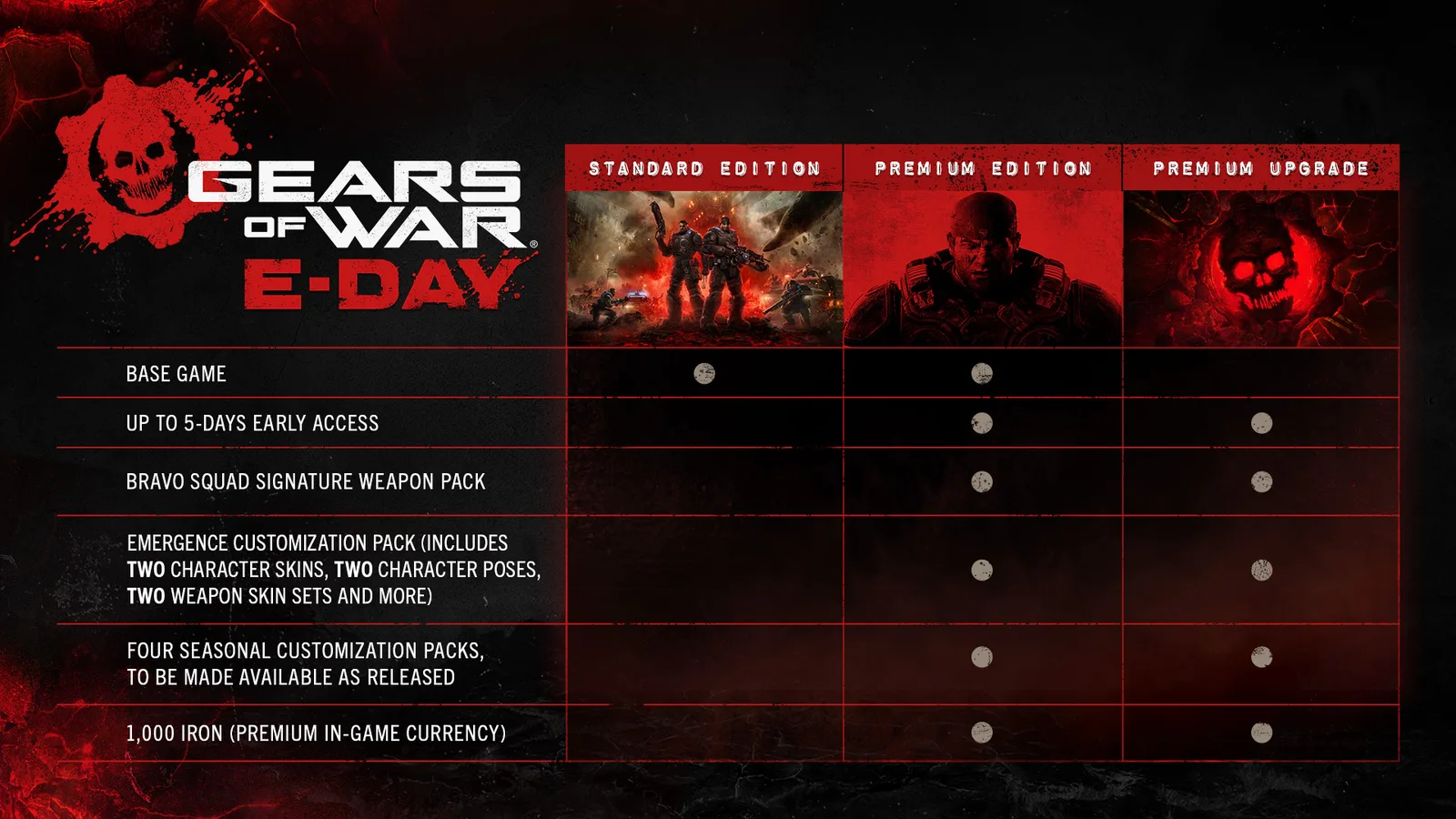
Edition comparison showing the differences between Standard, Premium, and Premium Upgrade.
Use this decision rule:
- Choose Standard when you need the complete base game and do not want the Premium extras.
- Choose Premium when you need the base game and deliberately value its listed digital extras.
- Choose Premium Upgrade only when you already have qualifying base-game access on the same ecosystem and have verified the upgrade's requirements.
- Reject a listing whose edition is unclear, even if its price resembles the edition you intended to buy.
Do not pay more for a listing merely because it still advertises early access or a preorder label. Evaluate the content that remains available after launch.
How to activate a Gears of War: E-Day Steam key
Once you have confirmed that the delivered item is an actual Steam key, redeem it on the Steam account that should permanently hold the game.
- Install and launch the Steam client on your Windows PC.
- Sign in to the correct Steam account. Check the account name before continuing, especially on a shared computer.
- Open the Games menu at the top of the client.
- Select Activate a Product on Steam.
- Continue through the activation notice until the Product Code field appears.
- Paste the code exactly as delivered. Avoid adding spaces before or after it.
- Follow Steam’s remaining prompts to complete redemption.
- Locate the activated product in your Steam library, check that it matches the purchased title and edition, and begin installation when ready.
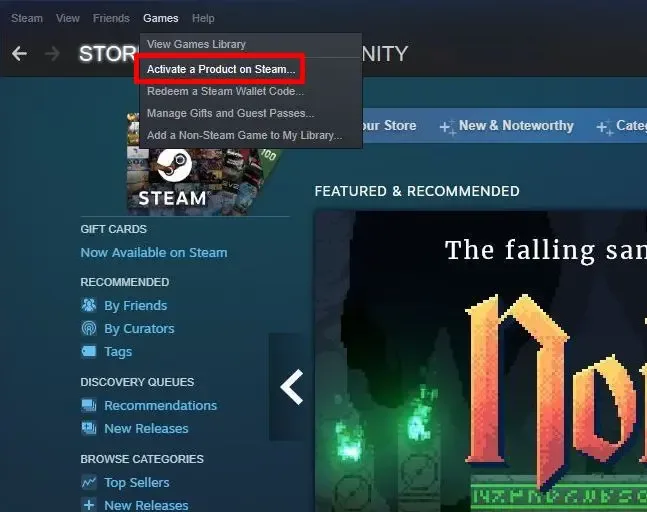
The Steam menu path used to redeem a product key.
If the activated library entry is an unexpected product or edition, preserve its displayed name and contact the seller with the mismatch. Do not assume it will change later or enter additional codes in an attempt to correct the order.
A Steam gift follows its specified gift-delivery process rather than the product-code steps above. A Steam account listing provides credentials instead of a redeemable code, and an Xbox code must be redeemed through Microsoft's system. Receiving one of those products is not evidence that Steam's activation feature is broken.
Steps for an invalid or mismatched code
An activation failure does not establish a single cause. First classify the failure from Steam's exact message and the original listing.
- Wrong platform: If the order says Xbox Live or Xbox Play Anywhere, the code was not sold as a Steam key. Do not repeatedly enter it in Steam.
- Wrong region: Compare the listing's activation region with your country. Preserve the region wording and Steam's rejection message.
- Duplicate or already used code: Capture the exact message without exposing the complete code publicly. Contact the seller through the order's support channel.
- Unexpected product: Record the product Steam displays before confirmation. Compare it with the purchased title and edition.
- Upgrade without the base game: Recheck whether the order is an upgrade-only item and whether your account owns the required base product on Steam.
- Gift or account delivered instead of a key: Reopen the order type. These products do not use normal Steam key activation.
- Missing delivery: Check the order page and the email address attached to the purchase, then use the seller's stated delivery-support process.
Keep the receipt, order number, listing title, platform, type, region, edition, final price, delivery record, and full error text together. Screenshots should show the relevant labels but should not expose the entire activation code. This gives the seller enough information to distinguish a platform mismatch, region restriction, wrong edition, duplicate code, or delivery problem.
Do not attempt to solve a region mismatch by changing account information or using a different network location. The purchase must be eligible for the account and location under the listing's activation terms. If eligibility was misrepresented, address the transaction with the seller or marketplace instead.
Final Steam-key checklist
Complete this checklist on the final checkout page, not only on a comparison result:
- The title is Gears of War: E-Day.
- The platform is Steam.
- The product type is Key.
- Your country is eligible for activation.
- The edition is Standard or Premium as intended.
- The product includes the base game if you need it.
- No expired early-access benefit is being counted as present value.
- The final total includes mandatory fees.
- The seller and delivery terms are visible.
- You have saved the listing details and receipt.
If every item passes, you have a listing that matches the intended outcome: a Gears of War: E-Day code redeemable to your own Steam account. If any field is missing or changes at checkout, leave the offer unresolved rather than assuming that PC, Global, or a familiar cover image makes it a valid Steam key.